HDI - Implementing Service Continuity Management
11.1 Overview
11.1.1 Description
The purpose of the IT Service Continuity Management (ITSCM) process is to ensure that the IT organization can continue to provide services in the event of an unlikely or unexpected disruption to the IT infrastructure. This process should be seen as being a fundamental part of an overall Business Continuity Management process, which considers all the elements required to operate a business function, including the IT infrastructure.
In the event of a major disruption, it will be necessary for the Support Center to continue to provide support for the IT services which will continue to operate, though IT operations may possibly be at a reduced level. It is essential that the continued operations of the Support Center are included in any plans for the continuity of IT services.
11.1.2 Relationships to Other Processes

Ensuring the continuity of IT services in the event of a disruption requires a thorough understanding of IT services provided and how they operate under normal circumstances. The ITSCM process must be aware of and take account of any factors that affect the operation of IT services, including all processes used to manage IT services. The following processes have particularly strong relationships with ITSCM.
- Support Center, Incident Management and Problem Management: these operational procedures must continue to function effectively throughout any disruptions; the ability to resolve incidents will be even more important since users will probably have reduced levels of service. The Support Center will have a key role during any transition to a failover site, keeping users informed of progress.
- Change Management and Release Management: it is vitally important to ensure that any changes made to an IT service are considered for their impact on the service's continuity arrangements.
- Configuration Management: understanding the infrastructure components which make up an IT service enables effective risk analysis and provides details of what components need to be considered for a failover site.
- Service Level Management and Financial Management: users' requirements for IT service levels must be understood to determine an acceptable level of contingency at an acceptable cost.
- Capacity Management: the capacity and performance requirements of a service in a disrupted state must be considered when planning the capacity of the service. Several processes outside IT Service Management also have an influence on ITSCM, including:
- Business Continuity Management: this process identifies critical business functions and the impact of their unavailability
- Workforce Management: plans for continuity of key skills must be in place as well as plans for transportation, lodging and meals for staff working at a remote failover location.
11.1.3 Key inputs and outputs to the process
| Description | Source | Importance
|
| INPUTS
|
| Service Catalog. This document, produced by the Service Level Management process, details all the services delivered by the IT department.
| Service Level Management | High
|
| Service Level Requirements. Also a product of the Service Level Management process, these detail service levels that users require under normal circumstances and in a disaster situation
| Service Level Management | High
|
| Business Impact Analysis. Produced as part of Business Continuity Management, this establishes the impact to the organization of the disruption or loss of each IT service provided.
| Business Continuity Management | High
|
| Comprehensive configuration details of each service. Provided by the Configuration Management process and ideally held in a Configuration Management Database (CMDB), this will be used in the analysis of risks to the infrastructure and to design contingency solutions
| Configuration Management | High
|
| OUTPUTS
|
| A risk analysis for each IT service, identifying risks, vulnerabilities and proposed risk reduction methods, recovery options and mitigations.
|
IT Service Continuity Management | High
|
| A strategy report identifying the approach toward continuity, business-critical services, priorities, costs, and timescales. |
IT Service Continuity Management | High
|
| A contingency plan with details of precisely how the contingency solutions will operate, from invocation of the plan through transition to the failover solution, operation of the solution, and reversion back to normal operations. This plan should be thoroughly tested; the results of those tests, including timings, problems encountered, and suggestions for improvements should be attached to the plan |
IT Service Continuity Management | High
|
| A risk analysis for each IT service, identifying risks, vulnerabilities and proposed risk reduction methods, recovery options and mitigations. |
IT Service Continuity Management | High
|
| A strategy report identifying the approach toward continuity, business-critical services, priorities, costs, and timescales. |
IT Service Continuity Management | High
|
11.1.4 Possible problems and issues
Lack of management commitment and funding: IT Service Continuity Management is like an insurance policy - you pay the premiums, but hope that you never have to make a claim. The problem is that providing continuity solutions for IT services can be expensive and it can be difficult to secure funding for something that might never be used. Determining the costeffectiveness of continuity measures requires two important steps:
- establish the impact of the unavailability of a business function
- determine the IT services that support that function.
Keeping the contingency plan up to date: as noted earlier, it is critical to ensure that any alteration in the way a service is delivered is reflected in the contingency plan for that service. Changes not reflected could cause problems if the contingency plan is ever invoked.
![[To top of Page]](../images/up.gif)
11.2 - Implementation
11.2.1 The implementation process
The ITSCM lifecycle is summarized in Figure 11.2 below. Each stage is described in more. detail later in this chapter.

11.2.2 Support Center Manager's role
The Support Center Manager (SCM) has a key role in the implementation of an organizationwide ITSCM plan. Because support is a key element of service, this area is critical in a disaster situation. The SCM works with the ITSCM Manager in each stage to ensure the role of the Support Center is understood and achievable in the recovery process of all services as well as the recovery of the Support Center itself.
The SCM has input into the Business Impact Analysis and works with specialists to perform a Risk Analysis of the Support Center itself. In addition, the SCM agrees and approves the strategy for risk reduction and disaster recovery. The SCM also produces the elements of the overall recovery plan for the Support Center and is responsible for initial and subsequent testing of the Support Center recovery plan. The SCM chairs a post-test review meeting to ensure any lessons learned are incorporated into the plan.
Deliverables
- Sign-off of the Business Impact Analysis
- Sign-off of the strategy
- Sign-off of the recovery plan to meet all the requirements of the Support Center
11.2.3 Support Center Function's role
All Support Center staff must be fully aware of their role in any planned recovery procedures. Fundamentally, they must be aware of the location of the Support Center following a disaster and the procedures that will be followed. Staff members will also play a key role in all tests related to the recovery plan. Staff should be rotated through the testing processes to enable as many people as possible to become familiar with the recovery procedures.
11.2.4 Planning for implementation
Before embarking on an ITSCM implementation project, it is essential to obtain the support and sponsorship of senior management. This level of support is critical to a successful implementation and must include adequate financial backing. Once support is obtained, a team should be assembled and a project initiated to implement the ITSCM plan. If possible, this team should include be the same people who will have ongoing responsibilities for ITSCM, though temporary external specialists may be used during the implementation phase.
Groups to contact
Disaster Recovery suppliers who may be required to supply some of the external contingency:
- offsite storage suppliers
- real estate agents for possible accommodation provisions
- fire protection services
- disposal
- insurance
- security systems
- uninterruptible power supply system providers
- external specialists.
Necessary resources and relationships
In addition to expert specialists and ITSCM software tools, it is wise to involve experienced project management personnel and robust tools in the implementation. Strong relationships with Business Continuity specialists, Risk Management personnel, security staff and relevant external suppliers are very important to building a successful plan.
Necessary information and data
The BIA and Risk Analysis will produce all information required to proceed with implementation of the ITSCM process.
Measurements that should be in place
- All services covered by the Business Impact Analysis
- All locations covered by the Risk Analysis
- Recovery procedures written
- ITSCM plan produced and initial test conducted
11.2.5 Implementing key process activities: hints and tips Things that always work
It is very important to make the test of the ITSCM contingency plan as realistic as possible. For example, banning all access to the data center and staff by the test team will most closely mimic an actual disaster scenario.
Little things that always get forgotten
When conducting a Business impact Analysis (BIA), do not forget the application that started on someone's PC and has now developed into a business critical application.
When conducting a BIA, do not just speak to managers and do not just consider financial impact. Think of all the possible impacts including impact to company reputation and impact to customer relationships.
When conducting a Risk Analysis, identify single points of failure in the staff as well as in the hardware and network configuration.
All changes must be assessed for their impact on the ITSC plans, so do not forget to make sure the change process is updated during the ITSCM implementation phase.
11.2.6 Key process activities
This section contains details of the key activities to implement ITSCM. These are:
- acquire the Service Catalog
- acquire the Service Level Requirements
- conduct a Business Impact Analysis
- conduct a Risk Analysis and Risk Management
- produce a strategy including the appropriate continuity solutions
- produce an integrated IT Service Continuity Plan
- test the plan
- maintain the plan.
In addition to the activities above, you should conduct an awareness briefing for senior management with a presentation of the findings resulting from the business impact and risk analysis. This can take the form of a workshop during which the various options could be discussed.
Acquire the Service Catalog
The IT organization must define and document the services it provides. The mechanism for this, the Service Catalog, should contain basic details about the services such as hours of operation and hours of support. This document is produced and maintained by the Service Level Management team.
Acquire the Service Level Requirements
Before finalizing Service Level Agreements (SLAs) and Operating Level Agreements (OLAs), the SLM team will need to understand business requirements as well as the ability to deliver against the requirements. A key aspect of an SLA is the content on continuity covering basic details about the planned recovery time following a major disaster. Developing this content will involve ITSCM staff as well as the SLM staff, Support Center requirements will be of paramount importance as the ability to recover the Support Center it self will be vital following a disaster.
Business Impact Analysis
A Business Impact Analysis (BIA) is part of the business continuity function. This analysis will assess the criticality of each service in order to ascertain its relative business priority, and therefore the recovery order and level of recovery required. For example analysis may indicate that a reduced level of service at the Support Center may be acceptable for a defined period of time while full recovery is in operation.
Input for the business impact analysis will be obtained through a series of structured interviews with business representatives. Interview data presents a clear picture of the nature and timing of any required continuity measures to meet business needs. This involves:
- assessing the potential impact of loss of services to employees and clients
- determining key deliverables from each service and essential timings
- identifying any legal, political, moral or business obligations
- determining the extent and nature of any manual backup procedures
- assessing the impact of loss of services (impact could be financial, legal, moral, political etc.)
- interviews should also be performed with Support Center and IT staff to ensure a full appreciation of the impact following loss of service. The findings from the analysis should be documented in a report and updated regularly.
The BIA exercise has other benefits to IT and to the business areas:
- it helps improve communications between the business areas and the IT department. The BIA provides tangible evidence that the management of IT Services is aligned
- it facilitates any future introduction or review of agreements over the levels of service to be provided to business areas
- it assists in the planning and design of the IT service infrastructure that underpins the various business processes
- it provides an understanding of the impact and risks involved when making changes to the IT infrastructure
- it assists in prioritizing the resolution of the underlying problems that may jeopardise the ability to meet service levels
- it surfaces any communication gaps such as having access to toolkits and alternate contact numbers, as well as any access gaps such as physical access to required premises.
Risk analysis
The goal of risk analysis is to reduce the possibility and impact of a disaster and to ensure a speedy recovery is possible should one actually occur. A risk analysis identifies possible threats and ascertains vulnerabilities. Business case cost justifiable countermeasures to the identified threats should be documented in the report in the areas of hardware, physical layout of equipment, backups, software, security, documentation, skill levels, and network infrastructure.
Specific areas that need to be addressed in the Support Center will be:
- people - the most important part of the Support Center will be the front line staff who take the calls. The risk analysis needs to assess skill levels and dependency on individuals as well the whole team
- technology - the system being used for call taking as well as the actual data will need recovery so backup strategy (including off-site storage) must be assessed
- telephony - resilience to failure of the telephony will need to be assessed
- operating procedures
- logistics, including getting to the backup sites, interstate accessibility, and airport dependencies.
`
Production of strategy including the appropriate continuity solutions
The output of business impact analysis and risk analysis should form the overall continuity strategy. This is likely to be a combination of risk reduction measures as well as recovery options or continuity solutions. Once the risk analysis has been carried out, and the results correlated with the business impact information, the most suitable option for system recovery will have to be identified. This must take into account the suitability of any available internal facilities and the identification of suitable external providers. There are various options available as follows:
- manual workarounds and backup: this may be an effective interim measure, but most services cannot be provided this way. Paper backups work for a limited period in the Support Center, providing telephone and staff availability
- reciprocal arrangements : this is where resources are shared with another organization. This is a possibility for Support Centers, but not a practical long-term solution
- gradual recovery (also known as Cold standby): this provides accommodation with environmental infrastructure but no computer equipment. This can be internal, third party fixed or third party mobile and would provide accommodation for the Support Center staff
- intermediate recovery (also known Warm standby): this provides replacement-computing equipment ready to use in a suitable environment on which services can be recovered relatively quickly. This can be internal, third party fixed or third party mobile portable where the computer equipment is contained in a trailer and transported to the site by truck
- immediate recovery (also known as Hot standby): this means dedicated computer equipment mirroring critical business systems is ready to take over live running immediately with no loss of data (continuous availability in Availability Management terms).
Production of an integrated IT Service Continuity Plan
The purpose of the IT Service Continuity Plan is to provide complete documentation for the continuous availability of critical IT services identified during the BIA. It is essential that this plan is incorporated into the overall Business Continuity Plans. In accordance with industry best practice, the continuity plan should encompass:
- business requirements for disaster recovery
- essential services covered by the plan with recovery priority ratings
- business continuity team members and their duties
- names (individuals and organizations), telephone numbers and addresses of all relevant contacts
- a description for disaster detection and impact assessment up to the point of invoking the plan
- a description of the disaster recovery procedures
- guidelines on salvaging equipment from the disaster site and arranging cleaning and repair as necessary with details of possible contacts
- all relevant insurance details
- procedures following failure of air conditioning or power
- procedures invoked when changes are implemented that affect the contingency plan.
The plan should interface with the recovery procedures for the systems and applications.
The organization-wide Business Continuity Plans and IT Service Continuity Plans will cover the recovery of the organization as a whole. The Support Center is often not integrated into this process as well as it should be. The services provided by the Support Center are clearly vitally important to all organizations and should be integrated into the overall recovery process.
Testing the plan
It is important that the plan is tested as soon as possible after it is produced. Clear Terms Of Reference (TOR) should be produced for the test including definition of acceptance criteria and identification of who needs to be involved during the test.
During the test, it is recommended that an independent observer documents any deviation from the plan and milestones achieved.
Following the test, a short report should be produced that defines deviations from the plan, performance against recovery criteria, and recommended changes to the plan. This report should be presented as part of a post test review.
Ongoing maintenance of the plan
The plan must be maintained to ensure it is current and up to date; further details of this are included later in the chapter. It is imperative that the plan is considered as a Configuration Item (CI) in its own right and that all changes are reviewed for their potential impact on the plan.
11.2.7 Methods and techniques
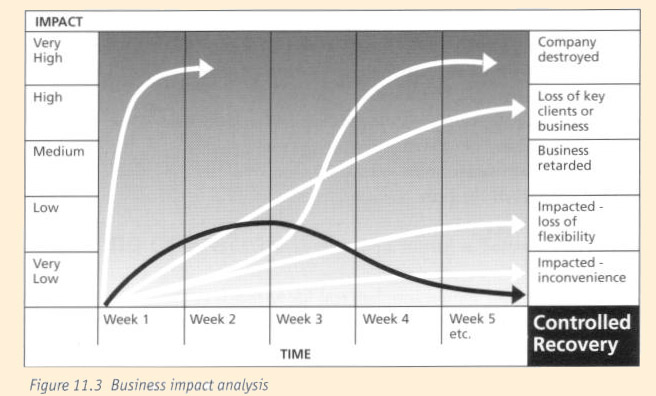
Figure 11.3 illustrates the Business Impact Analysis Method. Business impact analysis (BIA) focuses on the business needs of IT services. Being without any IT service will have a detrimental affect on the business but the severity of the impact will vary with time and also be affected by its point in the processing cycle. The impact of the loss of a real time service, such as trading in the money market, will be felt immediately while the business may cope for some time without other services. As well as establishing the urgency of each service, the BIA identifies the minimum requirements of each service to meet the critical business needs. In conducting a BIA, it is best to begin with a message to participants outlining the purpose and process for the BIA. This message should include a questionnaire to aid interviewee preparation (see Annex A11.1 for a sample).
Risk Analysis - Figure 11.4 illustrates the risk analysis and risk management activity.
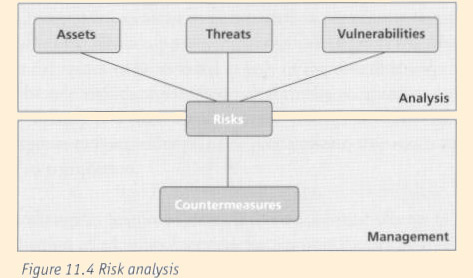
Risk analysis begins with the identification of assets that includes anything required to run the services (a Configuration Management Database will hold this information). This includes hardware, software, people, documentation, network equipment, telephony equipment, buildings and so on. Threats need to be associated with each asset type and these will differ depending on the asset. For example, potential threats to hardware include hardware failure, fire, flood and theft whereas potential threats to people include sabotage, absenteeism and lack of knowledge. The next stage is to analyze the likelihood of realization of the identified threat and the potential impact if it does happen. With this information cost-justifiable countermeasures can be taken from mirroring the whole installation to backing up data and skills transfer. There are specialist tools available to assist with conducting a risk analysis review. These tools normally contain a large database of possible countermeasures.
Production of the continuity plan - the actual plan is normally a simple word-processed document outlining actions to be taken and by whom in the event of a disaster occurring. Again, there are specialist tools available that assist with the production and maintenance of a plan.
Testing the plan - during testing of the plan, it is recommended that an independent observer documents any deviation from the plan and milestones achieved.
Following the test a short report should be produced, which defines:
- deviations from the plan
- performance against recovery criteria
- recommended changes to the plan.
This report will be presented as part of a post test review.
It is recommended that tests should simulate real life as much as possible. For example, ensure that data is only used from the offsite backup store and ensure that no one calls the live Support Center to request passwords, as the live Support Center may not be in place after invocation.
The Support Center will need to be sure that it can recover its services if a disaster occurs. The center may also have a role to perform during the recovery of other areas, perhaps undertaking the role of independent observer.
11.2.8 Audits for effectiveness
The following checklist lists items to audit to ensure the process has been implemented fully.
| Activity/Item | Confirmed date
|
|---|
| Aware of services provided and key customers |
|
| Business Impact Analysis conducted, results analysed and reports produced |
|
| Risk Analysis performed and prioritized risk reduction measures implemented |
|
| Overall strategy recommendation produced and signed off by senior management |
|
| Risk Management activities performed to mitigate against the possibility of
disasters affecting service operation |
|
| Service Continuity plan produced including full details of locations for recovery
and details of transportation and accommodation, if working away from normal
place of work |
|
| Initial test conducted to include location facilities, telephony equipment, PCs and
servers, network connectivity, access to users and customers |
|
| Test report produced |
|
| Test post-mortem meeting conducted, actions agreed and plans in place to update
the plan |
|
| Service Continuity plan is integrated into the overall Change Management process |
|
11.3 - Ongoing Operation
11.3.1 The ongoing process
After initial implementation, IT Service Continuity Management is concerned with the maintenance and testing of the continuity plans. It ensures that staff is aware of the plans and properly trained, auditing compliance with related procedures and coordinating any invocations of the plans.
It is critical that once developed, the IT Service Continuity strategy, plans and procedures are maintained and updated when necessary - not placed on a shelf and forgotten. There must be a good interface with Change Management to ensure that all significant changes are assessed for impact on service continuity. Where a proposed change will degrade the level of continuity currently present, this risk needs to be assessed as part of the overall change assessment. The change request could be rejected, the additional risk formally accepted or resource allocated to update the continuity strategy and plans to address the change. In other cases where the change necessitates a minor update to continuity plans or preparations, this needs to be identified, recorded and tracked to completion.
Major projects (e.g., a change in Support Center locations, a major change in Support Center technology, the introduction of additional services for Support Center customers) should all trigger a review of Service Continuity strategy and plans. Depending on the size and nature of the change, this may require Business Impact Analysis to be revisited and almost certainly will require further Risk Analysis to be conducted. It is important to foster strong communication within the organization, with partners and with customers so that any business plans or proposed projects that will affect the Support Center are identified as early as possible so that planning can take place.
Continuity plans should be tested on a regular basis, at least annually but preferably every six months. A testing program should include a range of test exercises. These could include:
- a tabletop 'walk-through' of the plan with key Support Center staff
- a detailed technical test of one aspect of the Support Center's technology
- a more involved test involving relocating the Support Center operation to an alternate location and recovery of the necessary facilities at that location.
In many instances the recovery of the Support Center may only be one element of a much wider test of IT and Business Continuity plans. In planning each test, a realistic scenario presenting a slightly different challenge to previous exercises should be developed and documented. Each test exercise should seek to break some new ground, perhaps by testing an area which has not been tested before, an area where there has been significant change, or by taking the test further than previous exercises by involving customers, key partners and interfaces with other systems.
One key benefit of testing is in the training and experience it gives staff in performing critical recovery procedures and in operating in the recovered environment. As noted earlier, staff involved in testing should be rotated to ensure that knowledge and experience is spread as broadly as possible.
Testing must be planned carefully to ensure that functionality is tested as much as possible without causing unnecessary impact on the normal functioning on the Support Center. For complex testing situations where critical live operations could be jeopardized, planning the test should involve a risk analysis exercise aimed at identifying and managing the operational risks involved.
Objectives should be identified in advance for each test exercise. These objectives may include the recovery of specific Support Center facilities within a certain time period, the validation of a new recovery procedure, the training of staff in a particular aspect of the recovery operation, or the testing of corrective actions taken following a previous test.
During any testing exercise a log and timeline of actions, events, issues and decisions should be maintained. Following each exercise, a post test review should be carried out to discuss achievements and any issues encountered, to ensure that the lessons learned are not lost and to plan any corrective actions necessary.
Another ongoing activity is that of promoting awareness of the continuity plans and the role that staff would be expected to play in the event of an invocation. This information should be included as part of orientation training for new Support Center staff. Annex Al1.2 contains example templates for the following documents used for testing the plan:
- IT Service Continuity Management Test Planning Form
- IT Service Continuity Management Testing Schedule
- Post Test Review Contents Page.
IT Service Continuity Management should seek to review and audit procedures such as those for making and verifying backups, updating continuity plans, and maintaining recovery facilities. This is aimed at ensuring compliance; where non-compliance is identified, corrective action should be instigated.
In the event that the Service Continuity plans are invoked, IT Service Continuity Management should ensure that the invocation is properly managed and that recovery and restoration actions are properly coordinated.
11.3.2 Support Center Manager's role
Responsibilities and activities in ongoing operation
The Support Center Manager works closely with both Business Continuity Management and ITSCM staff to ensure that measures exist to support continued operation of the Support Center according to agreed service levels during any interruption to normal operations. The Support Center Manager owns the part of the overall IT continuity plan which deals with continuity of the Support Center, and is responsible for ensuring that it is maintained and updated as continuity requirements change over time.
The SCM is involved in assessing change requests for impact on the Support Center, part of which involves considering whether the continuity strategy would be compromised or whether an update to plan will be required. The SCM should review the continuity plan at least annually to ensure that it still meets business requirements.
The SCM participates in determining the schedule and objectives for testing the parts of the plan involving the Support Center. The SCM also plays an active role in testing exercises to ensure familiarity with the plans. However, sometimes another staff member should perform the role to simulate a situation in which the Support Center Manager is unavailable. Following tests, the SCM provides input to post test review processes and where issues are identified, the SCM ensures that corrective actions are tracked and completed.
The SCM ensures that all Support Center staff are aware of the continuity plans and their roles in the event of an invocation and ensures that staff conform to the ITSCM process and procedures, including participation in audit activities, when appropriate.
Deliverables
- Sign off on testing schedule and objectives
- Input to post test review meeting and report
- Support Center continuity plan awareness materials
- Input to induction training materials
- Input to change request impact assessments
Competencies
- Knowledge of Support Center Service Level targets
- Good understanding of Support Center operations
- Familiarity with Support Center continuity plans
- Other normal competencies such as managerial skills, business awareness, negotiation skills, numeric skills etc
KPIs
- Frequency at which Support Center continuity plan exercises occur
- Post test reviews undertaken following tests
- Frequency at which Support Center continuity plan is reviewed
- Number of change requests assessed for impact on Support Center continuity
11.3.3 Support Center Function's role
Responsibilities and activities
Support Center staff is responsible for carrying out any routine procedures in their area that are required in order to support the continuity plans. This may include updating contact lists, ensuring that emergency backup telephones are charged, and maintaining a supply of paper based call-logging forms as part of manual backup procedures.
Where staff identify changes or issues that may affect Support Center continuity, they report these to the SCM. Support Center staff is also responsible for familiarizing themselves with continuity plans and take part in testing exercises in order to practice the procedures involved. In many instances the Support Center staff will be the first to become aware of a major Incident that necessitates the invocation of continuity plans. Depending on the Incident Management process, and more specifically the procedures for handling major Incidents, Support Center staff may play key roles in determining whether an invocation should be initiated.
During invocation, Support Center staff perform their roles as defined within the Support Center continuity plan which may involve traveling to an alternate location and working as members of a recovery team to restore service.
When continuity plans have to be invoked for other areas of the organization but the Support Center is not directly affected, staff will often still have to perform a role. They may need to provide communication and awareness about the event, updates on progress towards restoration and prioritization of support resources between `business as usual' incidents and recovery operations.
Deliverables
- Updated contact details
- Updated procedural documentation
KPIs
- Percentage of staff with experience of testing Support Center continuity plans
11.3.4 IT Service Continuity Manager's role Responsibilities and activities
The IT Service Continuity Manager is responsible for the ongoing maintenance and testing of the integrated overall IT Service Continuity strategy and plan. The IT Service Continuity Manager should work with the Support Center Manager to ensure that the continuity strategy and plan for the Support Center continues to meet the business needs and integrates smoothly with the overall continuity plan covering all service areas. This should include the provision of the necessary skills, tools and templates to support the ongoing maintenance of the continuity plan.
The IT Service Continuity Manager is responsible for maintaining a testing schedule and liaising with the Support Center Manager to determine scheduling, objectives and resources when tests will involve the Support Center.
Overall responsibility for promoting awareness of the continuity plans and ensuring that appropriate training is provided to recovery team members lies with the IT Service Continuity Manager. This individual should ensure that the IT Service Continuity Management process is complied with, by coordinating regular audit and review activities, so as to provide assurance to senior management as to the effectiveness of continuity provisions.
Deliverables
- Overall IT continuity strategy
- Integrated overall IT continuity plan
- Testing schedule
- Post test review reports
- Input to the impact assessment of proposed changes
- Updated business impact and risk analysis data due to changes
- Provision assurance to senior management
Competencies required
- Business Impact Analysis skills
- Risk Analysis skills
- Continuity Planning skills
- Project Management skills
- Normal competencies for any service management role such as good interpersonal skills, analytical skills etc
KPIs
- Number of tests carried out per quarter
- Number of tests occurring as scheduled
- Number of post test review reports produced
- Number of updates to business impact data
- Number of risk assessment carried out
- Number of instances of non-compliance to ITSCM policies
11.3.5 Steps and tips for ongoing operations
Ensure that there is a close interface with Change Management to make sure that proposed changes are assessed for potential impact on continuity plans. Have procedures to ensure that the plans are updated to reflect any changes that are implemented.
Keep plan documentation under change control and version control, with procedures to identify when, why and who has made changes to the plans. Use version control procedures to ensure that everyone is working from the same version of the continuity plan.
Build good communication channels with key business functions, partners and customers, to allow early identification of major projects that are going to impact the Support Center and require the continuity strategy and plans to be reviewed.
Review the Support Center continuity plan against business requirements and service level targets at least annually to ensure that it still meets those needs.
11.4 - Optimization
11.4.1 - The optimization process
Depending on the starting point, it may not be possible to immediately develop and implement all of the resilience desired to support continuity of the Support Center operation. Sometimes telephony or network changes will require that time is taken to build a business case, obtain funding, and initiate a project to plan, test, and implement. In some cases these changes will have to wait for larger plans for upgrading and improving the IT infrastructure. Similarly, changes to support contracts may have to wait until an appropriate point in the contract lifecycle at which time the contract can be renegotiated. Continuity planning cannot wait until all the ideal components are in place, so plans have to be made based on what is currently available and then updated and optimized as improvements are made to the infrastructure or new contracts are signed.
Regular testing of continuity plans is a major component of optimization. It allows issues to be identified and resolved, procedures to be adjusted, and staff to learn the process, all of which provide for improved recovery times. As noted earlier, staff participation in testing is very valuable because the experience that staff pick-up during testing helps instill a recovery mindset that improves their ability to respond and to recognize potential continuity issues in their normal work.
Audit and review activities also play a part in optimizing the process by identifying instances when plans have not been updated or when changes have occurred and their impact on the plans has not been initially appreciated. Recognizing these issues and taking steps to inform staff and improve procedures can improve the effectiveness of plan maintenance.
11.4.2 Support Center Manager's role
Responsibilities and activities
The SCM constantly seeks to maintain and improve both the Support Center's resilience and the efficiency of Continuity Plans. When involved in planning meetings, the SCM ensures that all risks to the operation of the Support Center are considered and that plans support improvements to continuity provisions. When audit and review activities identify areas where improvement to Support Center continuity plans and procedure are needed, the SCM owns and track these improvements to completion.
Deliverables
- Improved procedures and plans
- Corrective actions
KPIs
- Decrease in the number of non-compliances reported by audit
- Reduction in recovery time for services provided by the Support Center
- Reduction in the number and severity of risks
11.4.3 Support Center Function's role
Responsibilities and activities
As staff become more familiar with the continuity plans and recovery procedures they may often be able to identify potential improvements. These should be discussed during tests or in post test review meetings.
Deliverables
- Improvement suggestions from the Support Center staff
11.4.4 Steps and tips for optimizing this process
Always consider ways in which resilience measures or recovery procedures can be improved. Ensure full value is achieved from testing exercises by making sure that all the lessons learned are captured and action is actually taken to resolve issues and implement improvements. Do not forget that reviews should also be held following any live invocations as again issues and potential improvements will often have been identified.
Where possible, make sure that testing validates the ability of the Support Center Plan to work smoothly alongside plans for other functions and business areas.
11.4.5 Future impact of this process on the Support Center
In the case of ITSCM, it is worthwhile to consider the potential impact of not having this process. The Support Center is often the key contact point with customers during major incidents and disaster. The criticality of the Support Center operation must be recognized and its continuity assured.
ITSCM provides a structured mechanism for underpinning the Support Center operation with cost-justified resilience measures and `tried and tested' recovery procedures, in order to make the future a little less uncertain.
11.5 - Measurement, costing and management reporting
11.5.1 - Implementing: Benefits and Costs
The costs of ITSCM are sometimes difficult to justify as the majority of the benefits will not be realized until a major incident or disaster occurs. There are costs associated with planning, implementation, and optimization activities; costs may include the involvement of external suppliers and experts.
As noted earlier, it is often helpful to examine benefits by highlighting the potential costs of doing nothing. Some disaster impacts may be easily quantified (e.g., lost sales) while some will be more difficult to measure (e.g., damage to reputation.) The fundamental benefit of a fully implemented and tested continuity plan is that business continuity can be guaranteed under all planned for circumstances.
Making the business case to implement
Again, an examination of the impacts of a disaster should be the foundation of business justification of ITSCM. BIA and Risk Analysis will help identify the impacts and risks associated with loss of key IT services; these impacts and risks will suggest the appropriate level of spending on ITSCM. As noted above, ITSCM is very much like an insurance policy and the business decision to be made is a matter of how much coverage is desired. Obviously, it is impossible to predict a disaster and therefore it is impossible to budget precisely for ITSCM.
11.5.2. Ongoing operations
Costs
There will be an ongoing cost for any external continuity options and external off site storage activities as well as costs associated with the test.
Metrics and Key Performance Indicators
The key performance indicator will be a continuously up to date and fully tested IT Service Continuity Plan that is integrated with the overall Business Continuity Plan.
Annex Documents
Overview
Annex A11.1 - Business Impact Analysis Questionnaire
| Name: | Telephone:
| | Title: | Email:
|
| Department: | Section | Location
|
|
|
In the table below, list all of the IT applications or systems that your department accesses as part of their normal business processes. Include main business applications, corporate systems (e.g.: email), and any departmental databases that are used. Highlight any changes that are now needed to this information, including removing systems no longer used and / or adding any new systems.
|
| System Name
| Business Impact
| Recovery Timescale
| Minimum Access
| | | | |
| | | | |
| | | | |
| | | | |
| | | | |
| | | | |
| | Internet Access | | |
| | Email/diary facility | | |
| | Telephone system/ Phone Link | | |
| | Faxes/modems | | |
|
|
|
Assign a `Business Impact' to each system you have listed above, based on the options detailed below. The ratings should be based on the impact of loss of service to your department.
|
| BUSINESS IMPACT | Description
|
| MAJOR | Potentially serious impact to the organization (serious financial, public
relations, health and safety, political or legal consequences)
|
| SIGNIFICANT | Not `major' for the organization in the overall scheme of things, but
would prevent the department from performing its main business
processes
|
| DISRUPTIVE | Department could still function but with reduced throughput, staff
disruption and a potential impact on service quality
|
| MINOR | Could be worked around in the short term so would not prevent the
department from functioning as normal
|
| NONE | Little or no impact to the department's business
|
Assign a `recovery timescale' to each system you have listed above, based on the options detailed below. The ratings should be based on the requirements of your department. Of course, nearly all service interruptions will result in staff disruption, so the aim would always be to recover systems as soon as possible. However, following a major incident some disruption is to be expected; so give thought to how a service interruption would affect your department, and what length of interruption could be recovered from.
| Recovery Timescale | Description
|
| 1 | The impact is such that expenditure is justified to allow recovery
within 24 hours
|
| 2 | An interruption of up to 2 days could be recovered from
|
| 3 | An interruption of up to 3 days could be recovered from
|
| 4 | An interruption of up to 1 week could be recovered from
|
| 5 | An interruption of up to 2 weeks could be recovered from
|
| 6 | Would be OK for up to 6 weeks as long as the system was eventually recovered
|
| 7 | The system does not require recovery
|
Consider the minimum number of staff that would require access to each service during a major incident and document this figure in the `Minimum Access' column.
Critical Periods - for some systems the Business Impact and Recovery Timescale may differ according to the time of year. In these cases, fill out the table below.
| System Name
| Critical Period
| Business Impact During Critical Period
| recovery Timescale During Critical Period
|
| | | |
|
| | | |
|
| | | |
|
| | | |
|
| | | |
|
| | | |
|
Are theree any paper records, manuals, invoices or documents stored in your area that the department would not be able to function without if based elsewhere during the emergency? What would be the impact if these documents were destroyed? Give details below.
11.1.1 Implementation
The following Checklist lists items to ensure that the process has been implemented fully:
| Activity/Item
| Confirmed Date
|
| Aware of services provided and key customers |
|
| Business Impact Analysis conducted, results analysed and reports produced |
|
| Risk Analysis perform and prioritized risk reduction measures implemented Overall strategy recommendation produced and signed off by senior management |
|
| Risk Management activities performed to mitigate against the possibility of disasters affecting service operation |
|
| Service Continuity plan produced including full details of locations for recovery and details of transportation and accommodation if working away from normal place of work |
|
| Initial test conducted to include, location facilities, telephony equipment, PCs and servers, network connectivity, access to users and customers Test report produced |
|
| Test Post mortem meeting conducted, actions agreed and plans in place to
update the plan |
|
| Service Continuity plan is integrated into the overall Change Management process |
|
Annex A11.2 - Testing Process Documents
11.2.1 IT Service Continuity Management Test Planning Form
| System / Services to be tested
|
| Date of test
|
| Staff performing test
|
| User contacts
|
| Location of test
|
| Equipment required
|
| Test Scenario (type of failure, day of week, time of day, any special runs)
|
11.2.2 IT Service Continuity Management Testing Schedule
| Last Updated Date: | Last Updated by:
|
| Server/System
| Date of last test
| Result of test
| Planned dates
| Personnel of days
| Locatiun & Equipment
| User Contacts
|
| | | | | | |
|
| | | | | | |
|
| | | | | | |
|
| | | | | | |
|
| | | | | | |
|
| | | | | | |
|
| | | | | | |
|
| | | | | | |
|
| | | | | | |
|
A11.2.3 Post Test Review Contents Page
| 1 | Introduction
|
| 2 | Management Summary
|
| 3 | Objectives of the Exercise 4 Scenario
|
| 5 | Achievements Against Objectives
|
| 5.1 | Recovery Within Target Timescale
|
| 5.2 | Provide Recovery Experience For New Staff
|
| 5.3 | Test Database Recovery Following Upgrade
|
| 5.4 | Validate Updated Procedure For Filestore Recovery
|
| 6 | Personnel Involved
|
| 7 | Equipment Used
|
| 7.1 | In House Items
|
| 7.2 | Externally Supplied Items
|
| 8 | Recovery Times
|
| 9 | Events and Issues Encountered
|
| 9.1 | Erroneous Tape Procedures
|
| 9.2 | Connection Problems
|
| 9.3 | Application Password Incorrect
|
| 9.4 | Laptop Connection
|
| 9.5 | User Permissions
|
| 9.6 | Database Corruption
|
| 9.7 | Inconsistencies Following Restore
|
| 9.8 | Space Problems
|
| 9.8 | Insufficient Skills
|
| 9.10 | Integrity Check Run Accidentally
|
| 9.11 | Simulating Evening Batch Work 9.12 Database Unload Job 9.13 Cleardown Procedures
|
| 10 | Documentation Changes Required
|
| 11 | Corrective Actions and Improvements Required
|
| 12 | Recommendations for the Next Testing Exercise 13 Timeline Of Events
|
