| 
|
Incident Management
Table of Contents
|
|
|
The primary goal of the Incident Management process is to restore normal service operation as quickly as possible and minimize the adverse business impact of a service shortfall, thereby facilitating optimal quality and availability of IT services provided.
Process Requires Re-writing for conformance with ITIL Version 3.
More...
|
|

|
Introduction to Incident Management
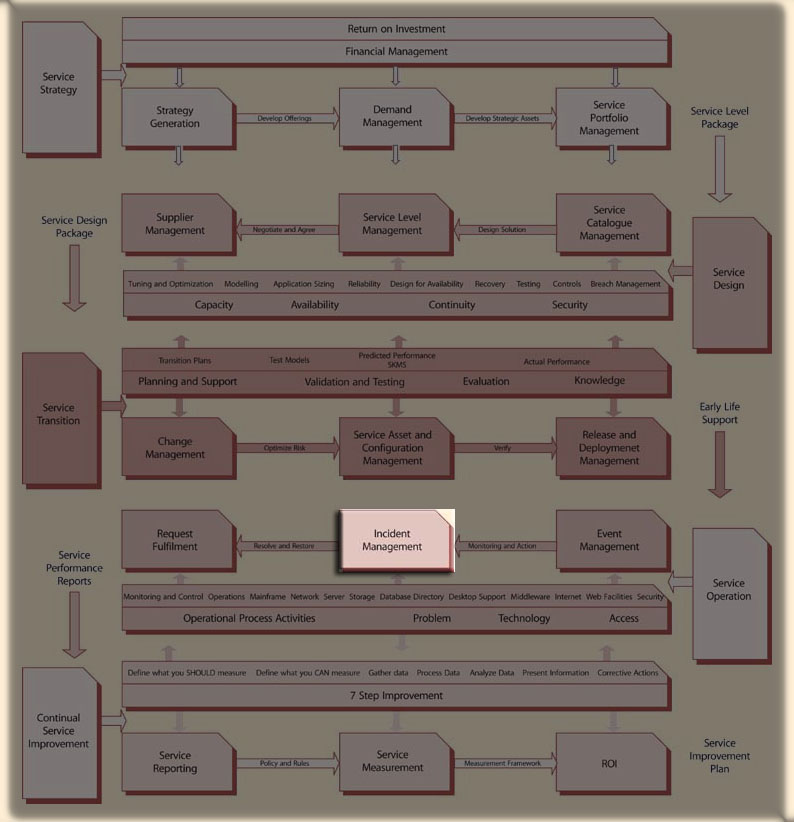
Incident Management is a process within the Service Operation module of the ITIL Service Lifecycle.
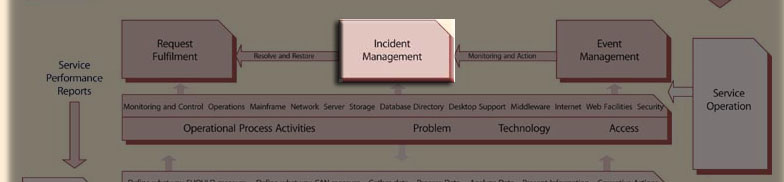
An incident is defined as "any event which is not part of the standard operation of a service and which causes, or may cause, an interruption to, or a reduction in, the quality of that service."
Most IT department specialist groups contribute to handling Incidents at one time or another. The "First Point of Contact" with regard to this effort is always the Service Desk. Moreoever, it should remain responsible for monitoring the resolution effort for all registered Incidents. In doing so, it accepts initial OWNERSHIP of the Incident. To act efficiently and effectively requires the use of formal methods, supported by software tools which ...
- match the incident to one or more previously reported incidents - preventing re-work and facilitating coordination of activity,
- enlist the use of known solutions or Work-arounds in order to achieve service restoration as quickly as possible - without necessarily discovering the cause of the incident and without significant additional effort,
- identify the best technical or service group to consider an incident which cannot be resolved immediately - in order to ensure the best use of scarce resources,
- establish a method of arbitrating amongst competing incidents for resources which best considers overall business impact - through prioritization of incidents occurring during overlapping time frames,
- collects information on incidents in a manner which facilitates process assessment of recommendations for improvement - in order to proactively enhance the availability of services.
![[To top of Page]](../images/up.gif)
Incident Management
The determinants governing the Incident Management Process have Capacity implications - the retention and use of optimal resources for recovery of incidents without idle resources. This implies a continuing need to identify the number and type of expertise needed to restore service when faults and outages occur. To do this expeditiously without undue hardship to business operations requires the following kinds of considerations:
General
- Recording incidents and resolving initial inquiries quicklyR without the need for highly specialized (and expensive) expertise,
- Ensuring that all resolution activity is directed at the service restoration effort and that actions devoted to solving the cause of an incident do not prolong an outage,
- The quick and accurate identification of the required number and expertise of resources to work on the incident,
- The ability to escalate incidents in order to direct additional resources towards the resolution,
- The establishment of agreed-upon resolution time-frames with corporate business in order to establish a business-like relationship and to provide ongoing targets for service restoration,
- Assurance that incident are not "lost" by the invocation of procedures designed to ensure continuing "ownership" of the restoration effort,
- The communication of estimated outage times to lines of business so that they can modify their work to minimize adverse business affects,
- The maintenance of past information on similar incidents in order to quickly identify workarounds and solutions,
Additional considerations in large enterprises
- Tiered services should be considered wherein specializations distinguish functions such as:
- Call reception and initial diagnosis
- Call routing
- Product specializations
- Prioritization of incidents in order to ensure the incidents of a more serious impact are worked on and resolved first,
- The provision of self-help tools so that users can either
- Resolve simple and/or known problems quickly (ie. knowledge bases),
- Be alerted that action has been initiated (bulletin boards), or,
- Initiate requests themselves (online incident reporting and routing)
Critical Success Factors
- Clearly defined roles amongst incident, problem, availability and change management
- Accessibility to configuration data, as well as the ability to keep track of problems for each configuration component, is provided
- An accurate means of communicating problem incidents, symptoms, diagnosis and solutions to the proper support personnel is in place
- Accurate means exist to communicate to users and IT the exceptional events and symptoms that need to be reported to problem management
- Training is provided to support personnel in problem resolution techniques
- Up-to-date roles and responsibilities charts are available to support incident management
- There is vendor involvement during incident investigation and resolution
- Post-facto analysis of problem handling procedures is applied
Scope
In Scope
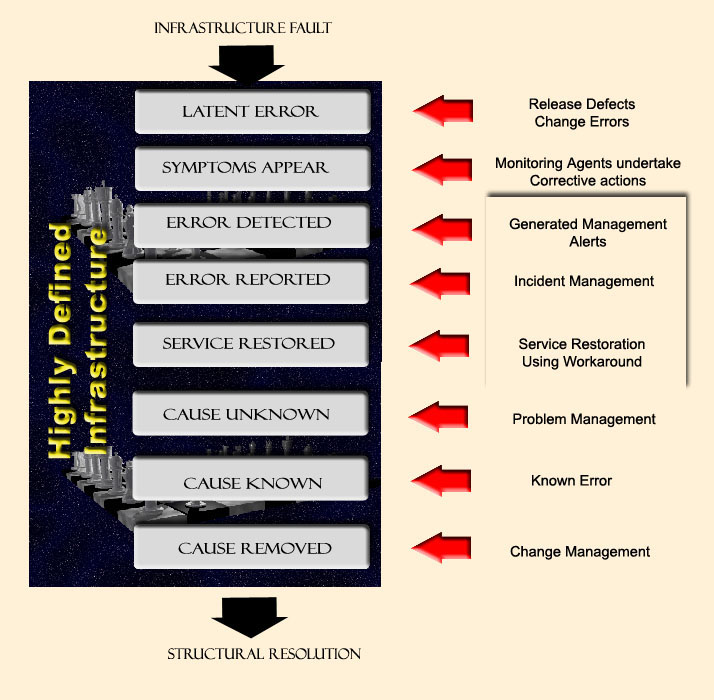
As illustrated above, an incident involves the recognition of a fault in the infrastructure at the points of Error Detected, Error Reported and Service Restored.
It can include …
- unreported incidents which the client learns to "live with" (e.g., inability to send e-mail from within internet browser) -- often, there may be an obvious "workaround" and,
- system alerts indicating elements of the infrastructure which have or appear to be moving toward operating outside normal operating parameters
Examples of categories of Incidents are:
Application
- service not available
- application bug/query preventing Customer from working
- disk-usage threshold exceeded
Hardware
- system down
- automatic alert
- printer not printing
- configuration inaccessible
Usually Excluded
- unless it negatively impact the User, an automatically registered event such as exceeding a disk-usage threshold, is considered 'normal' operations and will not normally trigger an incident
- Abnormalities and unexpected results occurring during testing of new systems in test or pre-production environments. Incident Management covers ONLY the production environment.
- Problem diagnosis and resolution which are managed through a designed Problem Management Process. The goal of Incident Management is the speedy restoration of normal service. Given this goal, service may be most quickly restored by implementing workarounds rather than permanent solutions which address the root cause of the service failure or degradation.
Discretionary
- Requests for information/advice/documentation (i.e., HOWTO inquiries), password resets and Moves, Adds and Changes (MACs) to personal computing equipment are covered by the Service Request process. Service issues which arise during the fulfillment of the Service Request may result in its' escalation to an Incident which would be covered by this process.
- Client and business requests for new or modifications to existing services. Technically these represents Changes (and hence are covered by Change Management procedures), but, the frequency of their occurrence and the limited risk posed by their introduction means they can be delegated to the Service Desk for implementation as part of the Service Request process. Note however, that the procedures for providing new service are documented and subject to Change Management control. New service provision is expected to be provided in accordance with the documented procedures.
- While the Service Desk presents a First Point of Contact (FPOC) for clients, parts of the technology infrastructure are controlled by business units with responsibility for specific applications and outside Service Providers. Some of these provide support for incident reporting by maintaining their own Service Desks.
Relationship to Other Processes
There is a close interface amongst Incident, Problem and Change Management processes. Incident Tickets may reference Problems and Known errors as being inter-related.

If not properly controlled, Changes may introduce new Incidents. A way of tracking back is required. Consideration should be given to retaining these record in the same CMDB as the Problem, Known Error and Change records, or at least linked without the need for re-keying, to improve the interfaces and ease interrogation and reporting.
View Fault Tracking and Incident Management
Problem Management
Escalation frequently changes an Incident into a Known Error and/or a Problem which may or may not result in a Change to the Infrastructure. The sequence of migration of an Incident through Incident and, subsequently, to Problem and Change Management is depicted below.
Incident
- An Incident is "an operational event which is not part of the standard operation of a system". It will impact the system but may be minimal and possibly even transparent to the client community.
Problem
- A condition identified from multiple Incidents or from a single significant Incident indicative of a single error for which the cause is unknown.
Known Error
- A condition identified by a successful diagnosis or the root cause of an Incident when it is confirmed that an object is at fault.
Problem Management differs from Incident Management in that its main goal is the detection of the underlying causes of an Incident and their subsequent resolution and prevention. In many situations this goal can be in direct conflict with the goals of Incident Management where the aim is to restore the service to the Customer as quickly as possible, often through a temporary Work-around, rather than the implementation of a more permanent resolution -- which may prevent future Incidents from occurring. The speed of service restoral is of paramount consideration in managing incidents, whereas, an investigation of the underlying Problem can require addtional time which will delay the restoration of service (causing downtime but preventing recurrence).
Many Incidents recur and the appropriate resolution actions are well known. This is not always the case, however, and a procedure for matching Incidents against Problems and Known Errors is useful. Successful matching provides proven resolution methods thus avoiding the need for further investigation effort. For those incidents that do not match the Problems / Known errors, the Problem Management can proactively / reactively perform causal analysis.
Resolved Incidents are analyzed and Problems are identified. Problems are analyzed and Known errors are determined. Known errors are analyzed and Request for Changes are created to correct the defective object causing the incidents.
Release Management
Release Management will introduce Errors into the infrastructure in the form of "Defects" - unresolved issues which are deemed of low immediate impact and which may be accompanied by Workarounds. Usually there will be a strategy to address the defect in a subsequent release.
Configuration Management
ITIL suggests that Incidents be referenced against Configuration Items (CI's) maintained in a Configuration Management Database (CMDB). The CMDB retains information on the interrelationship amongst Configuration Items and links to associated data on that CI - including Incidents which have been assigned against it. This definitional rigor permits the retention of important information on the health of the overall infrastructure and provides Incident
Management with the ability to more quickly size up the scope of an Incident (how localized or widespread are the possible affects) and to prescribe solutions (workarounds, Known Errors, etc).
Availability Management
Availability Management has overall responsibility for the continuing availability of the production environment. This includes oversight of the incident process as it affects MTTR - and hence overall availability. It is the responsibility of Availability Management to review and analyze the Incident lifecycle for inefficiencies which prolong the restoration effort. Availability Management will, in cooperation with Service Level Management, raise Service Improvement initiatives to streamline the incident process where bottlenecks are identified.
Because of its' impact on business operations, Availability Management may lead (or will certainly be involved in) Situation Management. The early restoration of Mission and Business Critical applications will have major affects on the costs associated with service failures.
Capacity Management
Capacity Management has a role to play similar to that of Availability Management for Situation Management when capacity issues are involved. They will usually participate under the leadership of the Situation Manager (who will frequently be a members of the Availability Management Team).
Scope and Characteristics
- There should be a single Incident Management Process which defines the process for recording and resolving all IT incidents (including home usage, voice & data services)
- The primary goal of the Incident Management system and of Subject Matter Experts (SMEs) working on the incident is the restoration of service to the same state that existed prior to the incident.
- Customers should report incidents only to The Service Desk or directly to an Online Services application.
- Performance metrics should be collected to measure the effectiveness and efficiency of Incident Management support processes and improvement projects will be implemented to ensure continuous improvement of the process.
- Web based self-help tools should be made available to provide information directly to Users on diagnosis techniques, restoration procedures and best practices for technology with the goal to reduce total calls to the Service Desk
- Wherever cost justified, application and infrastructure service organizations should incorporate tools, which will be used to monitor IT services and applications to identify incidents before and as they occur
Incident Process Control
- Service restoration times and communications protocols should be communicated to the Customer. SLAs will include the level and scope of support provided by the Incident Management process for all Clients
- The Service Desk should have end-to-end ownership of the incident - including communication with the customer.
- All Incident Tickets which have been ASSIGNED must have a current OWNER who is responsible for the resolution of that incident
- Whoever is assigned the ticket should be responsible for the restoration of the service unless formal "ownership" is transferred
- Incident ownership must be accepted before accountability for the Incident is transferred
- All incidents should be initially assigned Urgency and Priority Codes based upon pre-defined criteria should determine the priority treatment of the incident and establish its' service restoration commitment
- There should be a defined escalation process to ensure timely resolution of Incidents. The escalation process may re-define the urgency and/or Priority Code
- The Ticket Owner should establish the necessary linkages between Incident records, Change records, Problem records and Requests for Change
- There should be clear linkages between Incident records, Change records, Problem records, and Requests for Change
- All pertinent Incident information should be recorded into the Incident Ticket in a timely manner. No Ticket should be considered RESOLVED unless the Solution has been recorded into the Incident Ticket
- No Ticket should be determined RESTORED until the customer validates that their request has been completed or service is restored to their satisfaction. Exceptions exist for a Known Error or when a Request for Change is created, or, under extraordinary circumstances, when the SME deems it closed. The Incident Ticket will contain a log entry indicating this exception to the validation requirement.
Roles and Responsibilities
- The Service Desk should be the initial owner of all incidents reported to it
- The Service Desk attempts to resolve as many reported Incidents in the shortest possible time at first point of contact as possible
- First Point of Contact is a role assumed by an Incident Analyst upon first receipt of an Incident Ticket. The role performed is initial investigation and diagnosis of the incident using pre-established query scripts and knowledge sources to restore service as quickly as possible. If service is not restored the Incident is routed to an Incident Analyst for consideration
- (IA) is a role assumed upon routing from First Point of Contact. The primary objective should be to restore service within timeframes as defined and described in Service Level Agreements. The Incident Analyst should review the Severity Assignment and take appropriate steps to escalate incident resolution in order to meet restoration commitments established in SLAs.
Incident Ticket Recording
- All incidents should be recorded in an Incident Management data system
- All changes in the STATUS of an Incident Ticket should be logged to indicate the time the STATUS changed
- All Tickets should be assigned an initial Urgency and Impact. A Priority Code will be automatically determined based upon established criteria
Customer Interaction
- the Incident Management Process should communicate any known or expected degradation of service and impact to the affected Customer community and support family
- the customer should be informed by e-mail or telephone of changes in the STATUS of their reported incident
- all high severity incidents should have associated communications plans designed to keep affected business units informed of the restoration effort and estimated restoration timelines
Incident Management is one of the first ITIL processes an organization will implement. Most organizations will already have some incident management capability though it may be little more than informal recording of reported Trouble Tickets.
Most of the discussion on Incident Management implies an organization of a certain threshold. This threshold provides the organization with tangible benefits resulting from the recording of Incident information based upon the premise that the lessons learned from restoring service in one instance can be used to expedite subsequent resolutions. Beyond the normal incident analyst's ability to accumulate experience this implies some organizational capability to record incidents so that incident solutions can be shared amongst all Incident staff.
As the number of incidents in the organization increases there is a commensurate need to scale the Incident department. Like all good workload planning, this necessitates being able to distinguish Incident which can be disposed of quickly from those which will require more attention or different expertise. Mid-size organizations may solve this by :
- automating first point of contact through an online incident entry systems, or, alternatively:
- by enlisting by outside service bureaus to do one or both of:
- assuming the first point of contact role (although seldom the full suite of Service Desk functions) and utilize internal staff to attend to their specialized needs (which may also be distinguishable by corporate systems and business systems which remain within the protected enclave of the business unit itself), or,
- providing particular expertise, hardware and software which the IT Provider cannot provide economically,
At some point the number of Incidents being experienced leads to a requirement for more robust tools. Securing an Incident Management system to record Incidents becomes a necessity (a detailed list of Help Desk vendors is provided by the Helpdesk.com).
Functional Specialization
The larger the scale the greater the benefits that can be realized from specialization of function. This specialization means that scarce (and expensive) resources will be utilized in the capacities most suitable for them. In essence, this is a human form of Capacity Management - ie. matching and best using the overall capacity of the organization. Functions which are added on or distinguished during the exercise of scaling up the Incident Process include:
- First Point of Contact (ie. the Service Desk) become generalists in taking calls. There functions become:
- ensuring inquiry is from an authorized caller,
- answering HOWTO enquiries quickly,
- utilization of established scripts to extract incident information,
- utilization of knowledge bases to quickly answer standard inquiries and provide quick diagnoses and well-established solutions,
- knowledgable routing of more completed enquiries to the correct source
- establishment of self-help tools and Incident Bulletin Boards available to Users to resolve issues or make wide-spread incident known to the User community thereby reducing Service Desk workload,
- establishment of Incident Coordinators to offload administrative functions (eg. communications, quality control of Trouble Tickets, arranging meetings) from specialized Incident Analysts (ie. SME).
- establishment of Service Level Commitments for the restoration of service outages,
- the development of escalation guidelines to infuse additional resources towards the restoration effort in order to meet established service restoration commitments,
- enhanced concentration on the restoration of service at the expense of undertaking incident causal analysis - which becomes the responsibility of a separate problem Management organization.
- Identification of Availability as a separate functional requirement with a mandate for the analytical review of the incident management lifecycle in order to reduce the length of outages.
|
Key Concepts in Incident Management
|
Prioritizing
The priority of an Incident is determined by analysis and review of two dimensions - the importance of the component (known as a Configuration Item (CI)) out of service as a result of the Incident and the breadth or scope of the incident as determined by the number and organizational importance of the resources impacted.
The priority of an Incident is determined by a number of infrastructure, component and temporal characteristics:
Application Criticality
It is often useful to distinguish incidents according to the importance of the business operations affected. Mission Critical applications are client-facing business systems which, when not available, will lead to significant hardship for the enterprise. Of lesser importance are Business Critical applications, which can sustain some period of outage without immediate significant business impact. These are frequently internal administrative applications which support internal functions - ie. servicing those who service the customer.
Typically Mission Critical applications which, in the event of failure, might jeopardize ...
- the health and safety of clients or major groups of citizens,
- priority payments or revenue collection systems,
- defined legal or legislative requirements,
- affect key partner operations,
- that are required to be back in service within twenty-four hours in the event of failure.
"Business Critical" applications relate to core business functions, processes or procedures where failure would have an external impact. If the risks of system failure are manageable the impact can be considered low and a lower priority may be assigned.
Timing Influences
The importance of the CI to the organization usually doesn't change over time. However, there may be additional determinants of its' importance based on whether the Incident occurs during or outside of business hours. Obviously, an SLA for service restoration may be different if the organization has 12 hours to restore the service than if the Incident occurs during the peak of operations. These 'riders' are usually indicated in an SLA describing the CI. They speak to the issue of the breadth or scope of the Incident itself.
Pervasiveness
Major incidents are pervasive throughout the majority or a large part of the enterprise. They affect many staff or key staff involved in the output of key business processes. Business direction and management is usually considered one of these key processes. Localized outages may affect few staff by number but they directly affect the ability of the organization to direct or manage its' activities. Such key resources are considered VIP and are given added weight in assigning Severity to an Incident.
Past Proactive Efforts
Another important element in assigning a Severity to an Incident is an estimation of how quickly the service can be restored and the existence of contingency actions designed to reduce the impact of outages. The existence of backup systems and Critical Outage Plans for a key server, network or application will facilitate the quick restoration of service and hence reduce the impact which might be expected from the same Incident without these contingencies.
Severity Code Guidelines
These determinants have been applied in the following Severity Code assignment chart....
| Sev | Business Impact | Examples
|
|---|
1 |
A major service disruption which impacts a critical customer. The service is not immediately recoverable and a large number of users are unable to perform a significant portion or their duties.
| - Public-facing high use transaction or information-provider application failure
- An internet web server failure providing key business information to client group(s)
- a transaction-based or support application that serves a large number of government staff or agents
- Exchange e-mail server failure
- Domain server failure (PDC, BDC, DHCP, WINS) affecting a large number of people
- An application or service required by an Executive or EA
- an application required for Occupational Health and Safety purposes
- security application failure
- major virus attack
- major security exposure/breach
- Interrupted WAN connection to an e-mail server
- network "meet me" point failure
|
2 |
A situation which results in a loss of major functionality to a customer and severely impacts service. A Group of users are affected and unable to perform a portion of their jobs.
| - non public-facing applications or intranet sites impacting an entire organizational business unit/branch/section
- all internet access is down
- external e-mail delivery/receipt is down
|
3 |
A situation of minimal customer impact where a workaround is currently known and available. A small number of users are affected. | - non public-facing application or intranet site impacting a limited number of staff in a business unit/branch/area
4 |
A situation of no customer impact with a low impact on the organization's ability to deliver services
|
|
Categorizing Incidents
Incidents should be classified in order to...
- facilitate consideration in context with previous, similar incidents and available knowledge bases,
- identify the correct technical group to route an incident when in cannot be resolved quickly through reference to existing and easily accessible information
- facilitate analysis of incident types to develop improved proactive measures of incident prevention and containment,
- provide management information on the return on investment of incident management services in relation to other IT services.
Many Incidents are regularly experienced and the appropriate resolution actions are well known. This is not always the case, however, and a procedure for matching Incident classification data against that for Problems and Known Errors is useful. Successful matching provides proven remediation methods, avoiding the need for further investigation effort.
This attempt will involve routing the Trouble Ticket to an appropriate Subject Matter Group for subsequent treatment should any restoration efforts at first point of contact be ineffectual.
A current list of Incident categories is available in Appendix.
Incident Escalation
Escalation is a procedure whereby an individual or group is notified that a Incident exists and is a request for aid. It is typically performed via a telephone call or page out and is performed at a technical level for on call support. The escalation process is first invoked by the Service Desk to ensure that Incidents are resolved within SLAs and appropriate resources are notified as necessary. The process is necessary to ensure that unresolved tickets at all levels are proprly addressed for attention within the IT organization.
Transferring an Incident from first-line to second-line support groups or further is called Functional Escalation and takes place because of lack of knowledge or expertise or when agreed time intervals elapse (which triggers a re-evaluation of the resources assigned to the Incident). Automatic functional escalation based on established time intervals should be negotiated and agreed to by business operations and should be recorded in Service Level Agreements (SLA) for easy reference.
Hierarchical Escalation can take place at any moment during the resolution process when it is likely that resolution of an Incident will not be in time or satisfactory. Hierarchical resolution action is invoked when it becomes apparent that available resources may be insufficient to resolve the Incident. Management is required to approve additional resources. This should take place long enough before the (SLA) agreed resolution time is exceeded so that corrective actions by authorized line management can be carried out - for example hiring third-party specialists.
As resources are increasingly allocated to resolve the Incident, the resolution "TEAM" becomes bigger, more formalized with increasing role differentiation. The Incident Coordinator is assigned administrative and communication roles to free the Incident Analyst to focus on finding a solution. When there becomes a need for more expertise as the Incident escalates to a Severity 1, there is an increasing need for coordinating multiple activities (ie., project management). A Severity 1 Situation Manager is created to perform this role. Organizational scale may imply that these roles will be assumed by the same person.
Communications
Incidents require communications in order to keep those most affected by a failure informed of the progress being made towards resolution. It is important to acknowledge and demonstrate the responsiveness of the IT service provider to the consumers of the service. If delays are to be expected it is important to provide an estimate of the resolution time so that staff can plan their time accordingly.
In a recent survey by Forrester of service desk practices they idenitified the importance of regular updates on Incident Tickets as a source of poor customer satisfaction...
| "While technology users tend to be pleased with the demeanor of the help desk staff, they are least
likely to be satisfied with the timeliness of updates regarding the status of their issues. Seventy-six
percent of users who are satisfied with their help desk, compared with just 10% of users who are
dissatisfied with their help desk, are pleased with the timeliness of updates received. When we
asked tech users what the IT organization could do to improve, 41% overall suggested more timely
information on the status of issues. But two-thirds of users who are displeased with their help desk,
versus 36% of those who are satisfied with the help desk, are likely to suggest timely updates as a
necessary area of improvement.
The service desk is the eyes, ears, and face of the IT organization to the vase majority of business
users. When you think you’re communicating enough, take two steps further. Communicate
information and service expectations with each incident. Summarize and report — both up the
management chain and out to the users — on a monthly and quarterly basis at a minimum. It is
far easier to cut back on communications than it is to repair the damage an aloof and out-of-touch
service desk can cause for all of IT." Chip Gliedman, Thirty-One Best Practices For The
Service Desk, June 28, 2005, p. 6, The MUNS Report, Vol 5, issue 23, Nov 8, 2006
|
Incidents may also impact Service Level Agreements and may require immediate attention with specific protocols for keeping staff informed. With the increasing dependency of many job function on computing resources it is increasingly difficult to plan around the use of computing resources for extended periods. Moreover, service delivery to the public may be directly affected. Both require the invocation of contingency actions which may require some lead time in order to restore the service to its' original functionality. Keeping business units and personnel informed can have important financial implications.
It is best practice for an organization to establish default communications procedures for each of its' Severity determinations. A typical communications protocol might look like the following:
| Severity | Tier 1 | Tier 2 | Tier 3 | Management
|
|---|
| Who Does What | Service Desk records incident | Transfer to Incident Support | Transfer to Service Partners | Incident Support informs senior management and other necessary Fulfillment Providers
|
|
|
| Sev 1 | At Time of call | Immediately | at 1 hour | at 2 hours and every 2 hours thereafter
|
|
|
| Sev 2 | At Time of call | at 30 minutes | at 2 hours | at 4 hours and every 4 hours thereafter
|
|
|
| Sev 3 | At Time of call | as set out in SLA | as set out in SLA |
|
As a general rule Incident Initiators (ie., clients reporting an Incident) should be informed at the following times...
- Initial Status Report: This will be performed as soon as a problem has been reported, and a problem ticket is opened. Notification may not initially identify the cause or source of difficulty, but will report what network components are affected, the status of their functionality, and the scope of the outage in relation to Indiana University as a whole.
- Identification: This phase will state the cause and source of the problem (if not already related in the Initial Status Report), and what course of corrective action is being followed. An estimated time of resolution will be given, if at all possible.
- Updates: Periodic updates will be given per the above Severity schedule and until problem has been resolved. Any new information, milestones, or set-backs will be included.
- Closure: Upon closure, a resolution synopsis will be prepared and distributed immediately. This notice will include details regarding final resolution. Any other important pieces of information will also be disclosed. Review of the completed trouble ticket will be available upon request.
Incident Status
Throughout the Incident process the status of the Incident indicates it's progress through the system. The table below defines examples of codes which may be used to distinguish an incident as it migrates through the Incident Management process.
| These represent the most basic codes. Every Trouble Ticket should have the following three log entries to indicate STATUS changes.
|
| NEW | An incident has been received, logged and is active within the incident tracking database. This status is usually automatically created when a Trouble Ticket is created and is accompanied by basic information identifying the caller and an initial description of the incident.
|
| RESOLVED | The requested action has been fulfilled. This could be:
- the provision of information sufficient to satisfy a request (ie., a HOWTO question)
- the resolution of an outage (the identification of a workaround or permanent solution or a decision to allow the incident to be CLOSED without restoration, perhaps identifying a Known Error in the infrastructure)
- a request for service has been fulfilled (see separate process)
Care should be taken at this point to ensure that the solution used is recorded on the Incident database and noted in any Knowledge Bases used by the organization.
|
| CLOSED | The Ticket is now considered inactive and there is no further consideration of it beyond analytical purposes by Availability, Capacity or Problem Management. Unsolved Trouble Tickets may be recorded as Problem Tickets by Problem Management.
|
| Additional codes are used to indicate routing, diagnostic and resolution activities. Describing the Trouble Ticket according to elements in the Incident Lifecycle will provide Availability and Problem Management with valuable information to improve overall availability and to resolve recurring Problems.
|
| FAILURE | The best guess of the time when the device actually failed. The Incident Analyst should make a best guess from the person calling in or from automated alerts.
|
| DETECTION | The best guess when the failure was first detected by a user. This is not always the same as the time the Ticket was created.
|
| ASSIGNED | An incident has been assigned to an specialized individual or group for further investigation and resolution.
|
| WIP | Work In Progress. The incident is being actively considered by a person or team charged with restoring service.
|
| PENDING | The Ticket is a HOLDING position pending the availability of equipment or resources to work on it.
|
| INVESTIGATION | Notation with time of efforts to collect information about the incident including url of any web sites checked or literature referenced.
|
| DIAGNOSIS | Notation with time suggesting resolution of the incident (note: this is about restoration of service and may not be equated with solving the root cause of the incident).
|
| RESTORATION STARTED | A notation as to when an attempt at service restoration was started and what the results were.
|
| RESTORATION COMPLETED | The restoration of service to the condition preceeding an incident is complete - either by the First Point of Contact or following an escalation to another group for treatment.
|
| VERIFICATION | A notation as to when the User verified the system was restored.
|
| ESCALATION | A description of additional resources allocated to the incident.
Verification: A notation as to when the User verified the system was restored
|
| COMMUNICATIONS | A message notifying a Group has been issued indicating progress towards
|
Assuring Quality of Incident Data
Completing a Trouble Ticket to the rigour suggested by the complete set of the above codes obviously involves significant effort and can add to the restoration time frame. To reduce the impact of recording on the restoration effort many of the log entries can be entered after the restoration in completed.
The organization must decide how much effort it wishes to put into the Incident Database. The majority of the benefits of the above effort do not accrue to Incident Management. Instead, the primary beneficiaries of a quality Incident database are:
- Problem Management by:
- improved ability to track Known Errors,
- better identification of solutions and workarounds
- enhanced information to undertake pro-active Problem analysis
- Capacity Management by identifying incidents attributable to Capacity issues
- Availability Management through decomposition of the Incident lifecycle to identify process steps where bottlenecks are occurring.
Any proactive analysis of incident information assumes the overall reliability of the data itself. Unfortunately, all to often, once an Incident is CLOSED an analyst is encouraged to proceed to a subsequent Ticket rather than devoting sufficient attention to ensuring the accurate recording of the Incident.
If the organization wishes to undertake any proactive measures to remove faults from its' infrastructure it must consider the quality of the primary data source early and establish methods to ensure its' integrity. At a minimum this requires the accurate reporting of the solution - whether a resolution or a workaround. With a robust Availability Management process the organization may extend quality assurance to encompass the accurate logging of Incident events (perhaps using the extended STATUS codes cited above).
Organizations may wish to place this quality assurance role with the Service Desk (if charged with overall and/or continuing responsibility for the Incident), an Incident Coordinator (who assumes the Ownership from the Service Desk for the Ticket) or within an explicitly defined Quality Assurance section.
Incident Process Owner
- Primary source of management information on the Incident Management process.
- Manages the relationship with the Service Desk, and, is responsible for the adequate skill levels and performance of this process and supporting Incident Management Tools
- Ensures a smooth working relationship with the Problem Process Manager and Service Providers and with all necessary support organizations both internal and external
- Ensures provision and operation of Incident Management toolsets (e.g., On-Line System Help desk) to support the Incident Management processes
- Retrieving accurate and complete data for the Incident and Problem Analyses.
- Minimizing the adverse effects of incidents on service levels by...
- providing a point of escalation for customer concerns with service restoration activities and solutions
- ensuring that the Incident Management process and working practices provide value for money
- ensuring that stakeholders are represented in Incident Management processes
- ensuring customer satisfaction with the functioning and attitude of Subject Matter Experts
- Ensures that clear and effective procedures and working practices are in place for Incident Management.
- Reduces or eliminates re-occurring Incidents
First Point of Contact
All Incidents experienced by the customer are reported first to the Service Desk which records the call into the Service Desk system. This data repository is the single data source where all Incidents MUST be recorded. Depending on the nature of the Incident, the FPOC either assigns the request immediately to the Subject Matter Expert (SME) or attempts to provide a solution over the phone.
- Performs activities for the immediate restoration of service following a failure. These include...
- security/password questions
- print problems
- network connectivity questions
- Microsoft Office support
- administers status, progress and history of Incidents until ownership is transferred to a SME
- for Incidents resolved on First Point of Contact, it is ensured that the Customer who initially registered the Incident formally accepts the solution.
- minimizing the effects of Incidents on service levels while adhering to authorized procedures and working practices
- ensuring that Service Desk personnel motivation, knowledge, skill level and performance are maintained
- monitoring and maintaining customer satisfaction
- providing comprehensive and accurate management information about the quality of I.T. Incident Management service and customer support.
- Initiating related tickets on the customer's behalf ( e.g. a service request arising need to resolve an incident)
Restoration Owner (RO) - Subject Matter Expert (SME
The Restoration Owner brings diagnostic, investigative and technical expertise to solving incidents. For Severity 1 Incidents the RO may assume the role of a Situation Manager to institute more rigorous and formalized procedures for service recovery.
- executes activities (e.g., workarounds) necessary for the immediate resolution of incidents so those Customers can resume work as rapidly as possible following a service failure
- knowledge database referral and update
- provides expertise for the analysis and resolution of incidents
- provides correct and relevant administration of status, progress and history of incidents and requests for information
- minimizes the effects of incidents on service levels
- ensures adherence to authorized procedures and work practices
- maintains individual knowledge, skill level and performance
- contains the effects of incidents
- accurate and timely identification of Tier 3 Service fulfillment involvement
- undertakes initial root cause analysis for incidents
- ensures customer satisfaction
- establishes teams as required to do Incident Analysis
- coordinates setting up Situation meetings and triages with Incident Analysts, Service Providers and vendors to review Incidents and resolution progress
- records voice mails for Service Desk IVR
- writes and posts (or arranges for posting) of email and web content on the progress of Situations
- contacts clients to collect information on service failures and to notify them of progress towards service restoration
- ensures completeness and accuracy of the Incident Ticket
Situation Manager
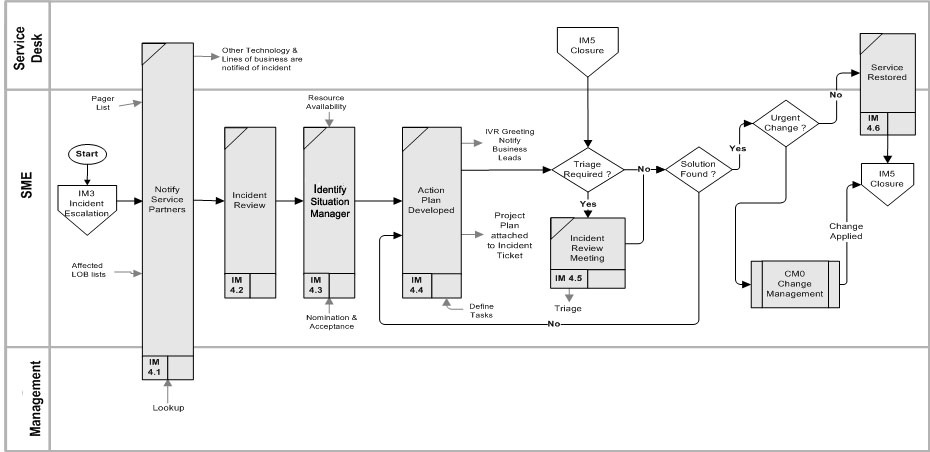
A Situation is a Major Incident requiring immediate restoration. The enterprise devotes as many resources to the restoration effort as are available. Given the scope of the exercise there is a need for specialization of activities and more intense coordination efforts. The Situation manager is responsible for coordinating the total effort.
- Provides input, communication, support, and coordination of the Situation Management process
- Provides expertise to assign, and assemble the required technical teams in order to resolve the incident as quickly as possible
- Manage the Incident Review process
- Monitor areas where technical or business risk may need to be escalated for specialist or management review. Build and execute escalation procedures based on individual client profiles
- End to end management of Internal Incident Reports and External Client/Executive Summaries from creation to closure
- Timely status reporting of activities and assignments will be required
- has temporary use of the many resources of the entire organization until the major incident is resolved
Service Partners
Service Partners have responsibility for components of the infrastructure. As owners of these Configuration Items they have responsibility for it's stability (including restoration from failure) and sponsoring any changes with regard to it. They implement a Request for Change to these items, undertake investigation and restoration of the component and may maintain Knowledge Databases.
Service Partners participate in Incident Management processes as needed. They:
- review Requests for Change for completeness and accuracy as required.
- assess impact on Business Information Model or functional specification with involved parties
- update assessment, functional specification, and production documentation as required
- identify resource requirements, dependencies and timeframes to implement changes
- Obtain approvals for the change
- modify infrastructure components owned by them in order to implement Request for Changes
- execute Service Request
- perform required tests
- transfer trouble Ticket information from their Help Desk System
- perform Root Cause Analysis when requested by SME and/or Problem Manager
- Log, approve and manage all workarounds, preventive actions, and Requests for Changes (CI Owner).
A Key Goal Indicator, representing the process goal, is a measure of "what" has to be accomplished. It is a measurable indicator of the process achieving its goals, often defined as a target to achieve.
By comparison, a Key Performance Indicator is a measure of "how well" the process is performing. They will often be a measure of a Critical Success Factor and, when monitored and acted upon, will identify opportunities for the improvement of the process. These improvements should positively influence the outcome and, as such, Key Performance Indicators have a cause-effect relationship with the Key Goal Indicators of the process.
Goal Indicators (targets)
- A measured reduction of the impact of incidents on IT resources
- A measured reduction in the elapsed time from initial symptom report to service restoration
- A measured reduction in unresolved incidents (Known Errors)
- Reduced time lag between identification and escalation of high-severity incidents
- Performance Indicators (outcomes)
- Elapsed time from initial symptom recognition to entry in the incident management system (Fault Detection Time)
- Elapsed time between incident recording and resolution or escalation (Mean Time to Repair)
- Percent of detected incident resolved through User reference to knowledge sources (Self-Help)
- Percent of reported incident with already known resolution approaches (i.e. workarounds, solutions)
- Frequency of coordination meetings with problem, change and availability management personnel
- Frequency of proactive component monitoring and reporting
Metrics
Service Desk
- Average length of time to answer a call
- Average length of time to get back to a voice or e-mail request (Online Services e-mail acknowledgement)
Incident
- total numbers of Incidents
- User hits on web based Knowledge Base (i.e. frequency of using Self-help tools)
- mean elapsed time to achieve Incident resolution or circumvention
- percentage of Incidents handled within agreed response time
- average cost per Incident (total number of incident / cost of services involved)
- percentage of Incidents closed by the Service Desk without reference to other levels of support
- Incidents processed per Service Desk agent or Workgroup first accepting the incident
- Number if incident re-directed (indicating mis-direction and hence longer resolution times)
- number of incidents re-opened or causing a subsequent incident
- customer satisfaction survey
- ratio of users support / service desk staff
Breakdowns of Above By
- method reported (phone, e-mail, web form)
- CTI
- Severity designation
- By line of business source
- Occurring during business and non-business hours (may be different for business unit reporting)
- support level (e.g. First Point of Contact, Workgroup, Vendor)
- number of incident escalations (different people accepting responsibility for Incident Ticket)
- FPOC Agent handling the Incident (and hence responsible for its' completion)
- Resolution result (workaround, solution, required change, required Service Request)
Measurement Issues
Effective management of distributed computing environments requires the development of a consistent process for defining, tracking and measuring service levels. Well-defined management processes, which define the IS management infrastructure and specify the measurements, are as important as technologies and functional processes to the success of consolidated service desk (CSD) implementation. Unfortunately, many IS organizations are often unable to define consistent, value-add metrics, as it forces them to confront weaknesses and identify gaps in service coverage. While end users and senior management often expect "ideal" service levels, the reality is that actual service delivery vehicles, such as hardware, software and personnel, are not perfect, creating an expectation gap. The most successful IS groups set appropriate expectations by developing SLAs in conjunction with end users and senior management.
When does the service commitment begin and end:
- START: from the best estimate of the time of service failure or from the time the incident was reported. Best practices would argue for the time the incident occurred but this time is often difficult to determine. Most organizations take the tact of using the time the incident was detected since it is more verifiable.
- STOP: from the time the service was restored by the incident analyst or after the User verifies that the service is restored to their satisfaction. The difference can be significant in instance where it is difficult to arrange verification by the User.
- Overlaps between Service Request, Incident Processes, the Service Desk and application incident resources need to be coordinated to ensure complete reporting
- Without established benchmarks of Incident Management process performance prior to the introduction of ITIL incident management methods, determining the degree of improvement will be mostly subjective

Incident Management Summary Process
|
| Controls
- Agreements
- Escalation Protocols
- Incident Guidelines
- Communications Protocols
|
|
Inputs
- Automated Alters
- Known Errors
- Knowledge Base
- Technical Support Documents
- Related Incident Tickets
- CMDB
| Activities
| Outputs
- Restored Service
- Customer Satisfaction
- Completed Incident Ticket
- Communications
- problem(s) and/or workaround(s)
- RFC(s)
- Updated Knowledge Base
|
|
| Mechanisms
- Incident Management System
- Related Information Systems
|
|
Inputs
Automated Alerts
An automated alert is a warning from an application or system of a pending or real failure to the device, either in total or a constituent part of an assembly. The alter may be by automated pager to a support staff "on call". Ensuing actions will depend on:
- the nature of the alert (immediate or pending failure),
- when it occurs (off hours, off peak hours or in peak hours),
- the business importance (ie. triggered Severity Code) of the Configuration Items affected by the alert
Alerts may be configured to automatically create a Trouble Ticket or the Support Agent may be responsible for the Ticket's creation.
Known Errors
Known Errors are logged and tracked defects in the infrastructure which are allowed to exist for one of the following reasons:
- a vendor may have a known, future plan for the elimination of the error (eg. patch, bug fix, upgrade, etc)
- treatment has been forwarded to Problem Management for consideration,
- the impact is containable,
- future IT plans may remove or reduce its' impact,
- the costs associated with removal are prohibative
Known Errors are tracked and monitored by Problem Management processes through Error Control procedures.
Knowledge Bases
A knowledge base is the organization's repository for known incident symptoms and recovery methods and procedures.
Consider it to be the first customer-facing tier of the Service Centre.
The more complete and accessible the Knowledge Base the more likely that incident can be resolved quickly, at first point of contact by the Service Desk. In essence, a knowledge base places the expertise of Subject matter Experts at the disposal of generalists. A Knowledge Base may contain:
- Frequently asked questions (FAQs)
- workarounds for known errors,
- diagnostic scripts to assist in the collection of information on reported incidents,
- recovery procedures
Many vendors offer FAQs specific to their product offerings, but, the most extensive and easy to use Knowledge Base probably belongs to Microsoft.
Related Incident Tickets
It is inefficient for the Service Desk to continue to create Incident records for multiple occurrences of essentially the same incident. A good Incident Management system should have the provision to increase a counter to provide an estimate of the extent of the incident's impact.
There is frequently a period of time when incidents are being reported to the Service Desk as independent events. The ability to correlate these occurrence through pattern matching practices, routines and procedures will aid in the speedy assessment of the incident's total impact and the breadth of the described symptoms and actions undertaken.
Technical Support Documents
Specific log files and documentation for individual technical support groups used to analyze and solve problems.
CMDB
The description of how Configuration Items involved in an Incident relate to other components of the infrastructure. The CMDB is a valuable tool in incident investigation in that it:
- permits a better assessment of the overall affect by defining the scope of CIs affected
- assists in diagnosis by specifying how Configuration Items inter-relate
- permits an assessment of infrastructure susceptibility by permitting the match of Configuration Items with Known Errors
Controls
Agreements
SLA, OLA and UCs are agreed-upon obligations which are translated into service specifications by the parties responsible to fulfill defined obligations.
Escalation Protocols
Escalation Protocols are defined rules for the review and possible redefinition of workplans associated with restoring service following an outage or service deterioration. They are usually agreed upon with a Customer based and itemized in an SLA. Escalation will usually involve the infusion of additional resources or resources or greater expertise in the subject matter area(s) deemed most appropriate to the restoration effort.
Incident Management Guidelines
Operational guidelines, including process, procedures, and roles and responsibilities for the Incident Management process.
Communication Protocols
Rules governing the usage of forms of communication (e-mail, meetings, reports) that occur internally within the IT support groups as well as with clients.
Mechanisms
Incident Management System
A database or some automated or manual system for recording Incidents for control and follow-up.
Related Online Systems
Other automated or manual systems interfacing with the Incident Management Systems. Such systems may include:
- a Configuration Management or Asset Management Database designed to manage computer assets and possible define their inter-relationships
- Knowledge Base is an information system where frequent outages and service restoration procedures are recorded
- Change Calendar is a listing of recent and upcoming changes within the infrastructure
- Problem Database lists known errors in the infrastructure. Project Defect Lists can be used to augment this list by the possible introduction of new known errors
Outputs
Restored Service
The primary output of the incident process is the restoration of the service and a reduction in the disruption of normal work processes caused by outages.
Customer Satisfaction
The process and manner in which the incident is attended to will be evaluated by the Customer (defined for this purpose as the person reporting the incident). Major satisfiers are:
- restoration within agreed upon timeframes (established per severity and priority categories)
- consultation in the establishment of a severity code
- appropriate communications during the restoration effort allowing persons experience the outage to adequately plan activities around the outage
Completed Incident Ticket
Every Incident is recorded in an Incident Management system - either by the creation of a unique Trouble Ticket or the amendment of an existing Ticket to record an additional outage. Collectively, this data system should permit an overall assessment of the extent of incidents and hence the stability of the overall infrastructure.
Best practices define a 'grace' period between the restoration of the service and the CLOSING of the Trouble Ticket. It is in this period that the incident is re-assessed to ensure that any symptoms do not re-occur. In addition, this period should permit the recording of Incident detail not entered during the 'heat' of the restoration effort. The explicit review of an Incident Ticket to ensure that solutions and log entries contribute to the overall enhancement of the data system would extend its' usefulness as a valuable Availability and Problem Management tool.
Communications
During the restoration effort user and business groups should be kept informed of key activities. Communications should be issued at the following junctures of the restoration effort.
- receipt of Incident Ticket (automatically generated e-mail)
- any change in the STATUS of the Ticket (ie. Work in Progress, In queue, etc)
- a change in the defined severity of the incident (eg. its' impact throughout the organization has become greater)
- any escalation of the restoration effort
Problems and/or Workarounds
The result of the restoration effort might include either the referral of the Incident to Problem Management for investigation of the root cause of the incident and/or the invocation of a temporary (or permanent) workaround to restore service without fixing the cause of the incident.
Request for Change
A proposed change to the environment or a configured item. A change may include moves and adds to individual items. A configuration item (CI) is an element in the production environment, such as hardware, software, network, or network software.
Updated Knowledge Database
Documented results of Root Cause Analysis (RCA) and work around and/or recommended solution to be utilized for future problem analysis and investigation.
Process Activities
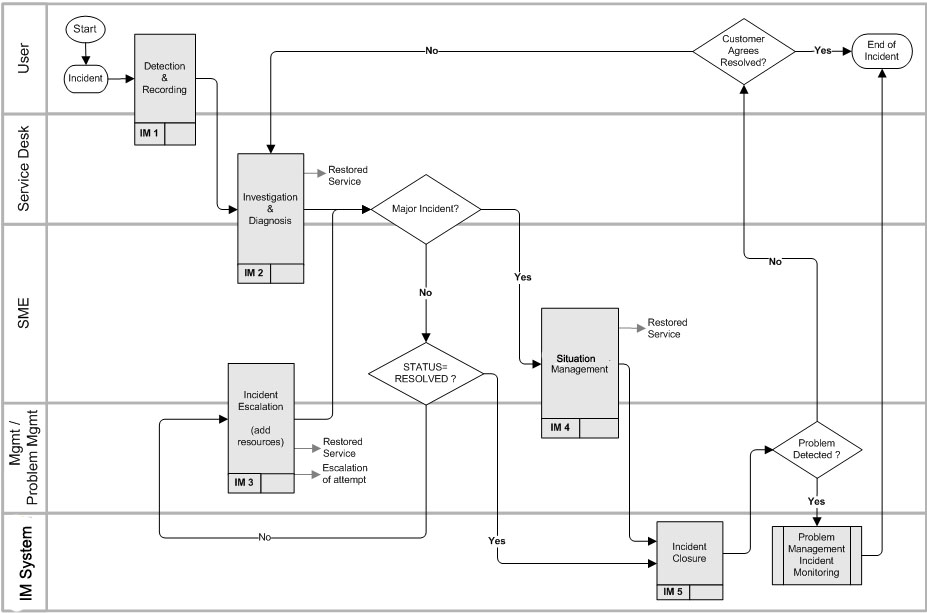
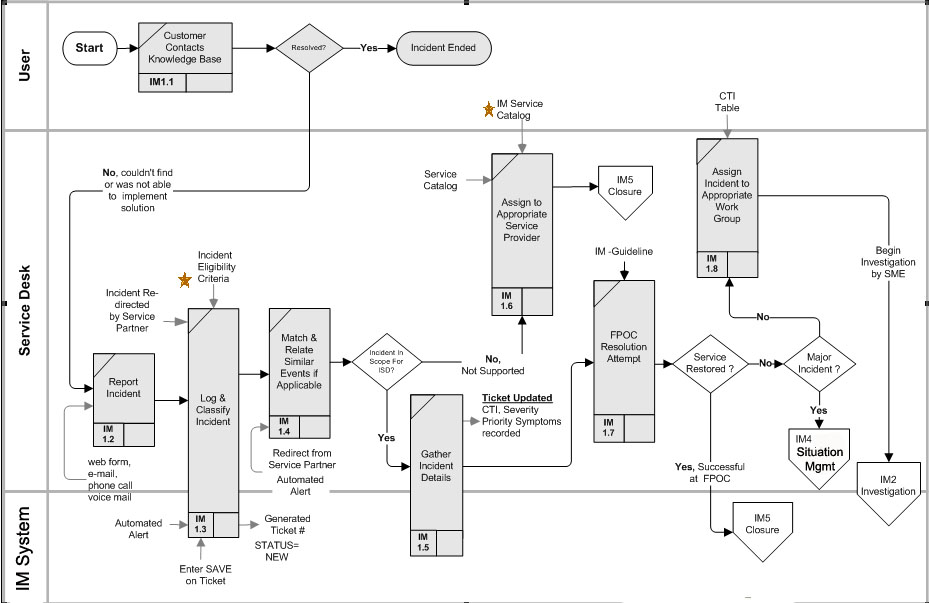
IM1 - Incident Detection and Preliminary Treatment
Define the fault in service continuity in a way which expedites incident containment and time to restore. and minimizes service disruption.
| All Incidents should be recorded, preferably through the automatic generation of an Incident Ticket to be completed as the incident is addressed and service is restored. Symptoms, basic diagnostic data, and information about the related Configuration Item should be included in Incident records during detection and recording.
An alert to the Service Manager is required in the case of serious degradation of service levels, in case it is necessary to take special action.
Incident should be handled using standard approaches and procedures and within timeframes negotiated with Customers of the Incident Management service. These timeframes represent service commitments within which IM will operate.
|
IM1.1 - Customer Contacts Knowledge Base
Facilitate recovery of many incidents at little cost by offering self-help facilities
A web portal contains information on commonly occurring problems and incidents which is known and readily accessible to clients. This facility permits a wide variety of frequently occurring problems to be fixed using solutions which can be invoked by the client directly, thereby, reducing the number of calls to the Service Desk. If the customer is unable to find answers through online self-service, the issue should be escalated to assisted service
channels like email, live help, or phone, in a context-sensitive manner. This escalation from self-service to
assisted service should appear seamless to your customers, i.e., they should not have to start it all again.
If the customer locates and implements the solution satisfactorily the Incident is considered completed. It is important to capture statistics on the use of the self help facility in order to supplement Incident statistics to accurately depict service volumes. The use of the information source might be accompanied by a question "Did you find your answer ?" and the responses collected to provide data on the usefulness of the Knowledge Base
If a solution is not found in the Knowledge Base the customer must contact the Service Desk.
IM1.2 - Report Incident
Offer a variety of methods to report incident to increase choice, encourage the recording of incident and achieve customer satisfaction with the interaction.
The Service Desk or an Online Incident/Service Request Management System represents the First Point of Contact for the recording of incidents. Alternate contact methods might be by web form, e-mail, phone call or voice mail.
Service Desk response rates are typically negotiated with customers and documented in SLA's.
IM1.3 - Log, Classify Incident
Log and classify the reported incident in a way which expedites its' treatment and resolution.
This assessment involves "initializing" the Incident Ticket with sufficient information to either resolve it quickly or route it properly to the subject matter group best able to restore service expeditiously. The Ticket is either filled in by the user accessing a web-based self-help form from the Incident Management System or is filled in by a Service Desk agent.
The following fields are typically filled in or automatically generated on the Incident Ticket during this stage:
- A reference number is generated for the Ticket
- Category, Type and Item (CTI) in which this incident should be classified.
- The STATUS is set to NEW and the SEVERITY to LOW
- A description of the incident's symptoms
IM1.4 - Gather Incident Details
Collect as much information on the incident as possible for subsequent diagnosis and restoration efforts.
An Incident Ticket is created with as much initial information as can be quickly collected.
If the Incident has been created using an online form then the eligibility of the person to report an incident has been established by their ability to access the form. If, however, the incident is reported through a call to the Service Desk, then the caller must be authenticated by matching them against a list of eligible users maintained in the Incident Management database. Any user calling in who cannot be located within the database will be assumed to legitimate for the purpose of the initial inquiry. If the incident can be resolved immediately then no further action is required to authenticate the caller. If, however, the incident needs to be routed to a SME then the Service Desk Agent should undertake a manual check by contacting appropriate business sources and then add the caller into the Online Services database. Further, the Service Desk Agent should undertake to ensure that any known additional databases are notified of the person's existence.
The User is encouraged to describe the symptoms associated with the incident and can be provided diagnostic scripts and references to existing events occurring within the infrastructure (including Known Errors, Problems and recent changes). A Service Desk agent has the ability to expand the diagnostic tools available. The assessment could involve some rudimentary and standard interventions (e.g., "pinging" a server to determine its' responsiveness), or reference to pre-existing conditions, incidents, changes, problems in the infrastructure with which this incident might be "matched".
The Service Desk agent should attempt to record what information sources and techniques proved particularly useful in any initial diagnosis.
IM1.5 - Match and Relate Similar Events if Applicable
Correlate reported incidents against a single event in order to avoid duplication of effort and facilitate determination of magnitude of service failures
Facilitate assessment of magnitude of service disruption while minimizing redundant work amongst reported occurrences of related incidents.
Reported Incidents are checked against an electronic Bulletin Board where high severity incidents are recorded for easy reference by Users and Support agents. If a match is found then the Ticket is associated with a Master Ticket on which restoration attempts are being logged.
The origin of these Tickets might also include automated alerts from management agents attached to servers, applications, etc or might include a re-direction from another Service Partner who originally received the Ticket either erroneously or, through investigation, suggests that consideration by another group may prove beneficial.
If the Incident is not part of a larger event it may still be related to past incidents, Problem Tickets or existing Known Errors. If discovered these other Tickets are associated with the new Incident Ticket. Some Incidents are widely felt and, in these situations, there may be a number of Clients experiencing and reporting symptoms. It is important to capture information on the extent of the incident and all resolution attempts, but there is seldom any benefit in logging and maintaining Tickets on all reported instances of the same root cause. Sometimes, the resolution of "related" items (i.e. incident, changes, and problems) may indicate a workaround or solution which can result in immediate service restoration. In the instances where a solution is readily identifiable service restoration can be immediately undertaken.
IM1.6 - Assign to Appropriate Service Provide
Use of common treatment for incident requests which are not considered part of the incident management service provided
Some reported incidents could be beyond the scope of Service Desk to consider.
Examples might be:
- incident related to facilities
- unsupported technology, software and devices
- unrecognized requester
The Service Desk agent hands the request off to the appropriate agent who deals with OUT of SCOPE requests. This person deals diplomatically with the client with reference to Service Catalogues and SLAs and may refer them to appropriate business manager for further discussions.
IM1.7 - FPOC Restoration Attempt
Restore service disruptions quickly without routing for subsequent consideration
Incident reported to the Service Desk agent may be resolved immediately. The agent attempts to restore service to the User by either talking them through a series of remedial steps or using remote software. The ability to solve problems quickly is determined by:
- the knowledge level of the service agent
- the availability of diagnostic scripts, knowledge bases and techniques
- access to known errors and problems in the infrastructure
IM1.8 - Route Incident to Appropriate Workgroup
Send incident to resources best able to solve problem in the least amount of time at acceptable cost
The Service Desk agent (as FPOC) will assign a CTI to the Incident which establishes to which group the incident will be referred. This routing will occur when:
- the agent has reached a predefined time limit and must pass the problem to a Subject Matter Expert for further treatment
- the incident is identified immediately as being beyond the skill level of the agent
- restoration of service requires security rights that the agent does not have
- the priority and nature of the incident requires the agent to forward the incident to a specialist or a priority-handling team
- the customer has requested that the incident be escalated
The Ticket's STATUS is set to ASSIGNED.
IM2 - Incident Investigation and Diagnosis
Record the incident's symptoms as accurately and quickly as possible in order to solve or route the incident to the source best able to resolve it expeditiously.
Once the Incident has been assigned to a support group, it should accept assignment of the Incident, specify the date and time (preferably automatically), ensuring:
- the Incident status and its history are regularly updated
- the Customer is kept informed of progress towards resolution via the Service Desk
- the current status of the Incident is reflected (e.g. work in progress, and so on)
The Service Desk should advise the Customer of any identified Work-around, if it is possible to provide one immediately. It should review the Incident against Known Errors, Problem, Solutions, Planned Changes or knowledge bases and, if necessary, ask the Service Desk to re-evaluate the assigned Severity and Priority, adjusting them as required, based on agreed service levels .
Wherever possible, affected Users should be provided with the means to continue business, though perhaps with degraded service. An example could be that faulty printers might necessitate printing taking place at another more distant location. The effect of such a Work-around is to minimize the impact of the Incident on the business and to provide more time to investigate and devise a structural resolution. Temporary Work-arounds may have to proliferate while a more permanent solution is worked upon.
|
IM2.1 - System Monitors Queue and Issues Alerts
Ensure incidents are not left unassigned for a prolonged time.
The service Desk continually monitors the queue for the status of Incidents being worked on in relation to service commitment resolution times. If, after pre-determined times, the STATUS continues to be NEW, pager and/or e-mails alerts are sent to designated staff and the Ticket is escalated to ensure it gets accepted by a group of SME (Subject Matter Experts).
IM2.2 - Ticket acceptance
Enter estimated Date for Change to be implemented and compare that date against other expected change at or near that date for any interdependencies
The escalation process continues until the Ticket is formally accepted and its' STATUS becomes ASSIGNED.
Escalation proceeds over four main groupings:
- Individual or group,
- try next person in group,
- Manager,
- Service Desk Management
Typical Automated Paging:
- Severity 1: first page is immediate upon recording, 15 minutes through each escalation level and every 15 minutes thereafter at final escalation level - 7x24 consideration
- Severity 2,3,4 (High, Medium, Low) Pages Issued: first page is 2 hrs (high), 4 hrs (Medium) or 5 hrs (low), upon recording, 1 hr through each escalation level and every 1 hour thereafter at final escalation level - business hours only
IM2.3 - Incident Agent (SME) Accepts Ticket
Acceptance of responsibility for Ticket restoration.
SME accepts Incident Ticket and STATUS is set to WIP (Work in Progress) or PENDING (on Hold). The time when the STATUS changed is recorded in the Incident record.
The time between STATUS=ASSIGNED and STATUS=WIP is a measure of process latency and attempts should be directed at reducing overall process latency. The commitment to accept the Ticket within established timeframes should be negotiated in an Operating Level Agreement (OLA).
IM2.4 - Classification
Completion and verification of Incident Ticket information by person or group accepting responsibility for it.
Incident Agent (IA) verifies or assigns Incident Severity, CTI and priority and assesses whether the assignment of the Ticket to their Work Group is correct. If the Ticket needs to be re-assigned it is returned to the Service Desk for re-consideration (note: if the IA knows the SME Group to whom the Ticket should be directed they may re-assign it directly. What is important to note is if there are any reasons for the mis-direction which can be used to improve future routing. These "lessons" should be directed to the the Service Desk (or application group charged with this responsibility) to make any adjustments to CTI tables or to modify any assistance associated with User Self assignment using the CTI tables.
IM2.5 - Investigate Incident
Develop resolution action for incident to restore service as quickly as possible.
Evaluate the incident and research solutions from Knowledge Bases, Known Errors, and Problem Tickets. Scenarios are investigated and recommendations made and tested. The time frame in which this is done is governed by a service commitment stated in the Service Catalog for Incident Management and negotiated in SLA/OLAs with Customer groups.
Until a workable solution is determined, the SME evaluates the likelihood that that restoration can be accomplished within the service commitment for this CTI and Severity assignment. If it appears that the incident cannot be resolved within the service commitment then a decision to add or change the resources devoted to resolution needs to be advanced. If the existing resources are deemed sufficient to solve the incident within established commitments the SME continues to investigate.
IM2.6 - Develop Resolution Strategy
Establish strategy to restore service with minimum risk to the infrastructure components.
Once a solution or workaround has been agreed upon the Incident Agent determines the most appropriate method to implement it. The timing of implementing the solution might need to be considered in view of the clients' and solutions current availability. The selected strategy is agreed to by the User and logged into the Incident Ticket and any restoration plans are attached to the Ticket.
Once the restoration method has been decided upon and agreed to by the Customer, control will transfer to other process based upon the conditions associated with the solution:
- Equipment and/or software might require a Service Request. In this case the STATUS is set to PENDING and the incident process is held in abeyance as the Service Request is acted upon.
- SR0 - Service Request process is invoked. When the Service Request- is fulfilled control returns to consider whether the service has been restored through the Service Request. If not, the restoration effort continues following the fulfillment of the request (eg. delivery of a piece of equipment).
- If the solution requires a change to the infrastructure then CM0 - Change Management procedures is initiated. When the Change is completed, the incident is considered as to whether the service has been restored properly.
- Investigation and diagnosis may become an iterative process, starting with a different specialist support group and following elimination of a previous possible cause. It may involve multi-site support groups and support staff from different vendors. It may continue overnight with a new shift of support staff taking over the next day. All this demands a rigorous, disciplined approach and a comprehensive record of actions taken with results.
IM2.7 - Restore Service
Restore service as quickly as possible using established resolution strategy.
All actions taken to date (eg. Service Request fulfillment and/or a Change) are considered in the context of whether they have adequately restored service to the User. If not, then service restoration using the most promising approach is undertaken. If no resources or a change is required then the Incident Agent undertakes to implement the selected Solution (which could be a workaround). The Incident Agent may need to negotiate a time for the restoration effort with the User, which might involve a site visit or, alternative, might be accomplished using remote software or walking the User through the solution over a phone. The Incident Ticket STATUS is set to RESOLVED and an e-mail is sent to the Customer informing them that service has been restored.
Control is transferred to the Closure process (IM5).
IM3 - Incident Escalation
Add resources to the incident to facilitate the restoration effort and keep business customers affected informed of the effort in order to permit them to minimize the effects of outages.
Escalation involves increasing the number and, potentially, the specialization of the resources devoted to resolution. Because of this increase there are issues of activity coordination and keeping Clients informed of the progress of resolution. The SME assumes control of the Incident and ensures that administrative tasks are completed.
- Transferring an Incident from first-line to second-line support groups or further is called 'functional escalation' and primarily takes place because of lack of knowledge or expertise. Preferably, functional escalation also takes place when agreed time intervals elapse. The automatic functional escalation based on time intervals should be planned carefully and should not exceed the (SLA) agreed resolution times.
- 'Hierarchical escalation' can take place at any moment during the resolution process when it is likely that resolution of an Incident will not be in time or satisfactory. In case of lack of knowledge or expertise, hierarchical escalation is generally performed manually (by the Service Desk or by SMEs).
- Automatic hierarchical escalation can be considered after a certain critical time interval, when it is likely that a timely resolution will fail. Preferably, this takes place long enough before the (SLA) agreed resolution time is exceeded so that corrective actions by authorized line management can be carried out - for example hiring third-party specialists.
|
IM3.1 - Review Restoration Approaches
Ensure that Changes are implemented as scheduled.
incident Analyst reviews the restoration approach with any external service providers who need to be involved in the effort and with any internal management who might need to approve of the approach and resources needed to ensure the effectiveness of the restoration.
IM3.2 - Escalation Communications
Keep people aware of escalation actions so as to ensure availabilities and assist those affected to better plan around the outage.
-
IM3.2.1 - Notify Management and affected Incident Agents
Ensure key staff are available for escalation action requests.
When escalation procedures are invoked the SME ensures a page is sent to the appropriate groups at set times according to Escalation Communication Protocols.
IM3.2.2 - Post Updates To Bulletin Board
Ensure all incident agents are informed of high severity incidents in order to ensure prompt action on related queries.
Severity 1 and 2 incidents are posted on an electronic Bulletin Board to keep management, Work Groups and Service Desk informed of high severity incidents and the progress occurring towards their restoration. The Incident Agent ensures that the Incident Ticket reflects communications undertaken.
IM3.2.3 - Update communications
Ensure all communication channels are updated so that information to those affected is current and accurate.
During the escalation there might be a need to update clients on the progress towards restoration. This permits them to adjust their work schedules accordingly
- When escalation procedures are invoked the Incident Agent ensures a page is sent to the appropriate groups at set times according to an established Escalation Matrix.
- Severity 1 and A href="javascript:donothing()", onmouseout="window.open('../process_bottom.html', 'ITILmess')", onmouseover="window.open('../definitions/severity_2.html', 'ITILmess')">2 Pager Updates to keep those involved in the restoration effort properly informed pages are issued according to the guidelines
- To keep those involved in the restoration effort properly informed, pages are issued according to the guidelines
- Broadcast E-mail
- An e-mail is sent to all clients submitting Tickets informing them of the estimated Mean Time to Repair (MTTR)
IM3.3 - Confirm Diagnosis and Resources
Abandon inadvisable approaches early and ensure that resources are appropriately allocated .
Management is approached to confirm the resolution process or to suggest alternate approaches and to approve how the granted additional resources will be assigned to the investigation.
IM3.4 - Work to find solution
Efficient investigation of incident and restoration methods as well as containment of effects of incident on infrastructure. Add knowledge learned during this effort towards resolving future incidents.
The incident Agent coordinates activities towards finding a viable solution to restore service and to minimize the effects of incident on the infrastructure and on business operations. All suggested solutions and abandoned approaches should be recorded on the Incident Ticket either during the investigation or immediately following it in order to capture the investigation process for later review and incident analysis.
IM3.5 - Service Restoration
Restore service with minimum impact on infrastructure.
When a restoration approach is agreed upon it is implemented. Care should be exercised in implementing solutions which might reverberate to other parts of the infrastructure (ie. should be considered a Change). In these situations, an appropriate Change Management authority (corporate or local) should be consulted for advise on implementing the solution.
IM3.6 Reference Escalation protocols governing treatment of incident
Honour service commitments governing incident resolution.
The restoration effort continues against a backdrop of service commitments for the Severity and Type of Incident. The Severity Escalation Protocols determine at what point during the restoration efforts automatic check-points for escalation (ie., adding more or different resources to the effort) are considered.
IM4 - Situation Management
Ensure a heightened availability and awareness for Incidents deemed of Major significance.
| A Situation is a major service disruption which impacts a survival or business critical service to an major business customer. The service is unrecoverable and a large range of clients are affected and are unable to perform a significant portion of their jobs.
The Senior Leadership Team in the organization needs to be readily available to advise or approve any recommended plans of action.
|
IM4.1 - Notify Service Partners
Ensure partners in the provision of services are made aware and able to prepare accordingly for the outage.
The Key line of business technical representatives - with responsibility for any Configuration Items affected by the incident - should be included in a pager list for all Severity 1 invocations. The representative self-identifies with any pages which might affect them and require attention. For Severity 1 Incidents the business leads for all affected business units are notified according to a designated list for each business.
IM4.2 - Review Incident
Ensure all relevant information is considered.
There may be a need to "triage" all knowledge sources to discuss the situation. This meeting, involving management, makes recommendations as to which Units and personnel will handle the incident and clears the way for any resource expenditures which may be required during the effort.
IM4.3 - Identify Situation Manager
Invoke protocols to ensure attention of Major Incidents as soon as possible.
Situation handling requires immediate attention and all efforts in this process are devoted to getting the most appropriate resources devoted to the restoration task as quickly as possible. For Situations, the Service Desk monitors reported incidents for frequency and severity (CI's affected). It also monitors the STATUS and if that status is not WIP (Work in Progress) within an interval established as a Service Commitment for the CTI affected then action is triggered to ensure the Ticket is accepted. The sequence of attempting contact is:
- A page is issued per the paging protocols. The Service Desk Agent awaits a response to this page. If, within 5 minutes, the page is acknowledged by the Workgroup Team Lead (identified as the BEST person to attend to the restoration effort) then processes branch to IM4.4 - Action Plan Developed.
- If not acknowledged within 15 minutes, a page and/or phone call is sent by the Service Desk Agent to a Backup Incident Agent. If this person contacts and accepts the assignment within 15 minutes then processes branch to IM4.4 - Action Plan Developed.
- If not acknowledged within 15 minutes, a page and/or phone call is triggered to members of the Senior Management Team alerting them to the fact that up to 20 minutes have elapsed and no one has called to indicate acceptance of the Severity 1 Incident. Contact Senior Management. When someone from Management (or one of the previous attempts responds) then processes branch to IM4.4 - Action Plan Devised/Revised. Otherwise efforts continue until someone is found.
IM4.4 - Develop Action Plan
Develop plan to coordinate activities and communications of Major Incident restoration effort.
A plan of action is developed or revised by the Situation Manager for identification of the incident's cause. Immediate attention is directed towards developing solutions for the restoration of the service. Hence, research centers on identifying known workarounds and assessment of risks in employing them. Depending on the action plan there may be a need to test a solution and consideration should be given to securing necessary equipment and resources if this is anticipated.
If the incident is resulting in widespread service outages wherein a number of callers may be reporting similar incidents, the creation of an IVR message alerting the callers that the situation is being attended to will inform customers while avoiding unnecessary attention by key resources. The recording or revision of an IVR message should be governed by an assessment of the benefits of providing the message or update.
A proposed message is composed using IVR message templates and remaining aware of the need for brevity in message duration. The message is sent to the Service Desk for placement on the IVR. After restoration of the service the IVR message is removed.
Key business leads are notified by e-mail and optionally, in addition, by phone that the situation is being worked on by the identified Work Group Lead and provided any estimates of the Time to Restore service.
IM4.5 - Conduct Incident Review Meeting
Invoke conferences to discuss issues and diagnoses associated with Situation effort.
There may be a need to "triage" all knowledge sources to discuss the situation. A meeting consisting of all available expertise is devoted to discuss the situation. In the case of an application failure the major Incident Manager should consult the appropriate Application Support Matrix to identify who the Subject Matter Experts are. On the basis of the discussion the Work Group Lead may re-visit IM4.4 - The Action Plan. When no further triages are necessary further action will depend on whether a solution has been identified as a result of the meeting. If no solution has been identified the Situation Manager may re-visit IM4.4 - The Action Plan.
If the solution requires a modification to the infrastructure then an Urgent Change process may need to be invoked to consider the risks associated with implementing the Change.
The Service Desk representative should attend these meetings and ensure a record of actions/decisions is maintained, ideally as part of the overall Incident record.
IM4.6 - Restore Service
Restore service as soon as possible.
Once a solution is determined the Situation Manager coordinates the Implementation of the recommended solution. If the change is Urgent, it may have involved invoking the Change Management process wherein the service was restored.
IM5 - Closure
Complete the Incident in a manner which promotes the identification and quick restoration of future service outages.
| Incident Ticket review for completeness and accuracy (e.g., it might be decided that this Incident was not similar to another Ticket it was associated with for resolution - i.e. incorrectly associated) and allowance of an adequate time for problems with the restoration effort to surface.
Ensure all knowledge bases are updated to facilitate the identification of future incidents which might be attributable to an identical or similar cause
If the solution was a workaround the resolved Incident might be referred to Problem Management for root cause analysis and subsequent treatment to eliminate future occurrences of this type of incident or to improve the workaround.
|
IM5.1 - Update ticket and knowledge bases with solution
Update all knowledge sources to facilitate earlier future consideration of similar incidents.
Ensure all knowledge bases are updated to facilitate the identification of future incidents which might be attributable to an identical or similar cause.
The Service Desk should ensure that the primary person working on the Incident records the solution to the Incident. This could be a workaround or the identified root cause of the incident.
Any IVR messages pertaining to a RESOLVED incident should be removed or updated to reflect the service restoration.
IM5.2 - Quality Control
Ensure Incident Log information is accurate and complete
- All Incident information is reviewed by the Service Desk to ensure accuracy and completeness.
- Logged entries are checked to contain proper dates
- Assignments and escalations are recorded with timestamps
- All communications are recorded with timestamps
- Investigations and diagnosis contain references to sources
IM5.3 - Close Ticket
Retire the Incident from active consideration.
After a period of 10 days in which the Customer has not experienced a re-occurrence of the symptoms, the Incident is changed from RESOLVED to CLOSED. If the Customer requests that the Incident be re-opened, it is re-assigned to a Workgroup and processing recommences as process IM2 - Investigation and Diagnosis.
Other action which could occur at this point include closing the Ticket as a result of it being out of Scope in IM1, or,
The Ticket could be referred to Problem Management for further treatment. This will often be the case when a Workaround is implemented and further investigation is required to determine the root cause of the Incident in order to implement a Change into the infrastructure so that the incident will not re-occur.
Terminology
| Term | Definition
|
| Availability | Ability of a component or service to perform its required function at a stated instant or over a stated period of time. It is usually expressed as the availability ratio, i.e. the proportion of time that the service is actually available for use by the Customers within the agreed service hours.
|
| Category, Type and Item (CTI) | Method for Classification of a group of Change documents according to three-fold hierarchical coding structure used by many organizations.
|
| Client | People and/or groups who are the targets of service. To be distinguished from User - the consumer of the target (the degree to which User and Client are the same represents a measure of correct targeting) and the Customer - who pays for the service.
|
| Causal Factors | Those contributors (human known errors and component failures) that, if eliminated, would have either prevented the occurrence of an incident or reduced its severity.
|
| Classification | Process of formally identifying Incidents, Problems and Known errors by origin, symptoms and cause.
|
| Change Management | Process of controlling Changes to the infrastructure or any aspect of services, in a controlled manner, enabling approved Changes with minimum disruption.
|
| Configuration Item (CI) | Component of an infrastructure - or an item, such as a Request for Change, associated with an infrastructure - that is (or is to be) under the control of Configuration Management.CIs may vary widely in complexity, size and type, from an entire system (including all hardware, software and documentation) to a single module or a minor hardware component.
|
Configuration Management
Database (CMDB) | A database that contains all relevant details of each CI and details of the important relationships between CIs.
|
| Core Business Process | A process that relies on the unique knowledge and skills of the owner and that contributes to the owner’s competitive advantage.
|
| Critical Success Factor (CSF) | Critical Success Factors - the most important issues or actions for management to achieve control over and within its' IT processes.
|
| Customer | Payer of a service; usually theCustomer management has responsibility for the cost of the service, either directly through charging or indirectly in terms of demonstrable business need.
|
| Environment | A collection of hardware, software, network and procedures that work together to provide a discrete type of computer service. There may be one or more environments on a physical platform e.g. test, production. An environment has unique features and characteristics that dictate how they are administered in similar, yet diverse, manners.
|
| Error Control | The processes involved in progressing Known errors until they are eliminated by the successful implementation of a Change under the control of the Change Management process.
|
| Impact | Measure of the business criticality of an Problem Often equal to the extent to which Incidents lead to distortion of agreed or expected service levels.
|
| Incident | Any event that is not part of the standard operation of a service and that causes, or may cause, an interruption to, or a reduction in, the quality of that service.
|
| Lifecycle | A series of states connected by allowable transitions. The life cycle represents an approval process for Change documents.
|
| Known Error | An Incident or Problem for which the root cause is known and for which a temporary Work-around or a permanent alternative has been identified. If a business case exists, an RFC will be raised, but, in any event, it remains a known error unless it is permanently fixed by a Change.
|
| Mean Time to Repair (MTTR) | The elapsed time to restore service measured from either the time of the failure or the time the failure was reported to the time the service was restored to the Users satisfaction.
|
| Priority | Sequence in which an Incident or Problem needs to be resolved, based on impact and urgency.
|
| Process | A connected series of actions, activities, Changes etc. performed by agents with the intent of satisfying a purpose or achieving a goal.
|
| Process Control | The process of planning and regulating, with the objective of performing a process in an effective and efficient way.
|
| Release | A collection of new and/or changed CIs which are tested and introduced into the live environment together.
|
| Request for Change (RFC) | Form, or screen, used to record details of a request for a Change to any CI within an infrastructure or to procedures and items associated with the infrastructure.
|
| Resolution | Action that will resolve an Incident. This may be a Work-around.
|
| Role | A set of responsibilities, activities and authorizations.
|
| Service Level Agreement | A written agreement between a service provider and Customer(s) that documents agreed services and the levels at which they are provided at various costs.
|
| Service Level Management | Disciplined, proactive methodology and procedures used to ensure that adequate levels of service are delivered to supported IT users in accordance with business priorities and at acceptable costs.
|
| Service Request | Every Incident not being a failure in the IT Infrastructure.
|
| System | An integrated composite that consists of one or more of the processes, hardware, software, facilities and people, that provides a capability to satisfy a stated need or objective.
|
| Urgency | Measure of the business criticality of an Incident or Problem based on the impact and on the business needs of the Customer.
|
| Version | An identified instance of a Configuration Item within a product breakdown structure or configuration structure for the purpose of tracking and auditing change history. Also used for software Configuration Items to define a specific identification released in development for drafting, review or modification, test or production.
|
| Work-around | Method of avoiding an Incident or Problem, either from a temporary fix or from a technique that means the Customer is not reliant on a particular aspect of a service that is known to be a problem.
|
COBIT Incident and Problem Management Maturity Descriptions
| 0 Non-existent | There is no awareness of the need for
managing problems and incidents. The problem-solving
process is informal and users and IT staff deal
individually with problems on a case-by-case basis.
|
| 1 (Initial/Ad Hoc) | The organization has recognized that
there is a need to solve problems and evaluate incidents.
Key knowledgeable individuals provide some assistance
with problems relating to their area of expertise and
responsibility. The information is not shared with others
and solutions vary from one support person to another,
resulting in additional problem creation and loss of
productive time, while searching for answers.
Management frequently changes the focus and direction
of the operations and technical support staff.
|
| 2 (Repeatable but Intuitive) | There is a wide awareness of
the need to manage IT related problems and incidents
within both the business units and information services
function. The resolution process has evolved to a point
where a few key individuals are responsible for
managing the problems and incidents occurring.
Information is shared among staff; however, the process
remains unstructured, informal and mostly reactive. The
service level to the user community varies and is
hampered by insufficient structured knowledge available
to the problem solvers. Management reporting of
incidents and analysis of problem creation is limited and
informal.
|
| 3 (Defined Process) | The need for an effective problem
management system is accepted and evidenced by
budgets for the staffing, training and support of response
teams. Problem solving, escalation and resolution
processes have been standardized, but are not
sophisticated. Nonetheless, users have received clear
communications on where and how to report on
problems and incidents. The recording and tracking of
problems and their resolutions is fragmented within the response team, using the available tools without
centralisation or analysis. Deviations from established
norms or standards are likely to go undetected.
|
| 4 (Managed and Measurable) | The incident/problem management process is understood at all levels within the
organization. Responsibilities and ownership are clear
and established. Methods and procedures are
documented, communicated and measured for
effectiveness. The majority of problems and incidents
are identified, recorded, reported and analyzed for
continuous improvement and are reported to
stakeholders. Knowledge and expertise are cultivated,
maintained and developed to higher levels as the function
is viewed as an asset and major contributor to the
achievement of IT objectives. The incident response
capability is tested periodically. Problem and incident
management is well integrated with interrelated
processes, such as change, availability and configuration
management, and assists customers in managing data,
facilities and operations.
|
| 5 Optimized | The incident/problem management process has
evolved into a forward-looking and proactive one,
contributing to the IT objectives. Problems are
anticipated and may even be prevented. Knowledge is
maintained, through regular contacts with vendors and
experts, regarding patterns of past and future problems
and incidents. The recording, reporting and analysis of
problems and resolutions is automated and fully
integrated with configuration data management. Most
systems have been equipped with automatic detection
and warning mechanism, which are continuously tracked
and evaluated.
|
Example Severity List
| Category | Severity | Dispatch To: | Description
|
| Acquisition HW/SA | 4 | |
|
| AS400 Problems and Issues | 1,2 or 3 | AS400 | AS400 printing setup, applications, system/service restart, mainframe mprinter
|
| HW install | 4 | Deskside/MAC | PC, printers, scanners, etc
|
| SW install | 4 | Deskside/MAC | Templates, standard image products
|
| MPR Account | 2 or 3 | | MMACs and deletions, resets for MPR accounts (MCBS & MOL only)
|
| Network | 2 or 3 | Network | MACs
|
| Network Connectivity | 1 | Network | Connects to network and MPR
|
| Network Issues | 1 | Network | Restoration of deleted files, missing drive mapping, rights to files and/or directions, rights on NT desktops
|
| Network Failure | 1 | Network | DHCP,WINS,DNS down, tape backup unit down, Novell server down
|
| Outlook Problems and Issues | 3 | Network | MS Outlook e-mail usage
|
| Desktop | 3 or 4 | Deskside/MAC | HW problems with a desktop device
|
| Printer | 3 or 4 | Deskside/MAC | printer driver issue, setup or troubleshoot
|
| Telecom - data | 4 | dispatch | ISDN, WAN, router, bridge, hub
|
| Telecom - voice | 4 | dispatch | phone and voicemail requests
|